
If you want to manage a remote team well, it all boils down to one thing: being intentional. It’s not about the fancy software you buy; it's about the deliberate communication systems you build from the ground up.
The real win is creating a framework that nails both real-time collaboration and the deep, focused work that happens asynchronously. When you get that right, everyone has what they need, exactly when they need it.
Mastering Remote Team Communication
In an office, communication just… happens. You overhear a conversation, swing by someone's desk for a quick question, or pull a few people into a huddle. When you're remote, that default setting is gone. Every single interaction needs to be deliberate.
Without a clear system, you're headed for chaos. Think constant pings, information getting lost in silos, and a team that’s perpetually burned out from feeling "always on." The solution isn't more software; it’s a shared understanding of how, when, and where your team connects.
Getting this right isn't just a "nice to have" anymore. Remote work is the new standard, and managers who get it are seeing huge payoffs. Studies have shown that remote employees can be 35% to 40% more productive than their in-office colleagues, mostly because they can actually focus without constant interruptions.
Design a Team Communication Charter
The single most effective thing you can do is create a Team Communication Charter. This isn't some stuffy corporate policy; it's a living, breathing playbook that defines the rules of engagement for your team. Think of it as the user manual for how you all work together.
Your charter should clearly answer a few critical questions:
- What is each tool for? Give every platform a specific job. For instance, Slack is for urgent, quick chats, while Asana is the home for all project updates and tasks. No more guessing.
- What are the expected response times? Set clear norms. A Slack message might get a reply within 3 hours, but an email is fine within 24. This simple rule eases anxiety and protects everyone's focus time.
- How do we document decisions? Decide where final decisions live so everyone can find them, no matter their time zone. This could be a project page in Notion or a "single source of truth" document in Confluence.
- When do we actually need a meeting? Reserve real-time meetings for things that truly demand them—like complex problem-solving, sensitive 1-on-1s, or high-energy brainstorming. Ditch the status update meetings that could have been an email (or an async update).
To really nail this, you need the right tech stack. For a great breakdown of what's out there, check out this list of the 12 best remote team communication tools for 2025.
The whole point of a communication charter isn't to add more rules. It's to remove ambiguity. When people know exactly where to find information and how to share it, they can spend less energy hunting things down and more energy doing incredible work.
Choosing the Right Communication Method
Knowing when to jump on a call versus sending a thoughtful, written message is a superpower for a remote manager. I always push my teams toward an "async-first" mindset because it fiercely protects their most valuable resource: uninterrupted focus time.
This doesn't mean we banish meetings! It just means we make them count. To dig deeper into these strategies, our guide on how to improve team communication offers more practical tips.
To help you decide on the fly, I've put together a simple table. Use it to choose the best way to communicate for different situations and help your team cut down on meeting fatigue.
Choosing the Right Communication Method
| Scenario | Synchronous (Real-Time) | Asynchronous (Delayed) | Recommended Tools |
|---|---|---|---|
| Urgent Crisis Resolution | Ideal for immediate problem-solving and alignment. | Not suitable due to time sensitivity. | Video Call (Zoom, Teams), Phone Call |
| Complex Brainstorming Session | Good for initial idea generation and dynamic collaboration. | Can be used for pre-brainstorming prep and post-session feedback. | Digital Whiteboard (Miro), Video Call |
| Daily Status Updates | Can lead to unnecessary meetings and disruptions. | Highly recommended to protect focus time and provide a written record. | Slack (Channel Update), Asana/Jira (Task Comment) |
| Detailed Project Feedback | Can be inefficient for in-depth, thoughtful review. | Ideal for allowing detailed, considered responses. | Google Docs (Comments), Loom (Video Recording) |
| 1-on-1 Performance Reviews | Essential for personal connection and sensitive conversations. | Not appropriate for the main discussion. | Video Call (Zoom, Teams) |
Ultimately, picking the right method isn't just about efficiency; it's about respecting your team's time and energy. When you get this balance right, you create a calmer, more productive, and more sustainable work environment.
Building Workflows for a Distributed Team
When you manage a remote team, you have to completely rethink how work gets done. It’s no longer about who's online at the same time; it's about designing smart, asynchronous-first workflows that keep the ball rolling across different time zones. Without this, your team will constantly be stuck waiting for someone to log on, killing momentum.
The whole point is to build a system where progress doesn't grind to a halt just because it's 5 PM in another part of the world. This means moving away from casual "drive-by" conversations and toward a more documented, transparent way of working. Get this right, and you empower everyone on your team to move forward on their own, which is a massive boost for both autonomy and efficiency.
A good starting point is having a clear framework for how to communicate in different situations.
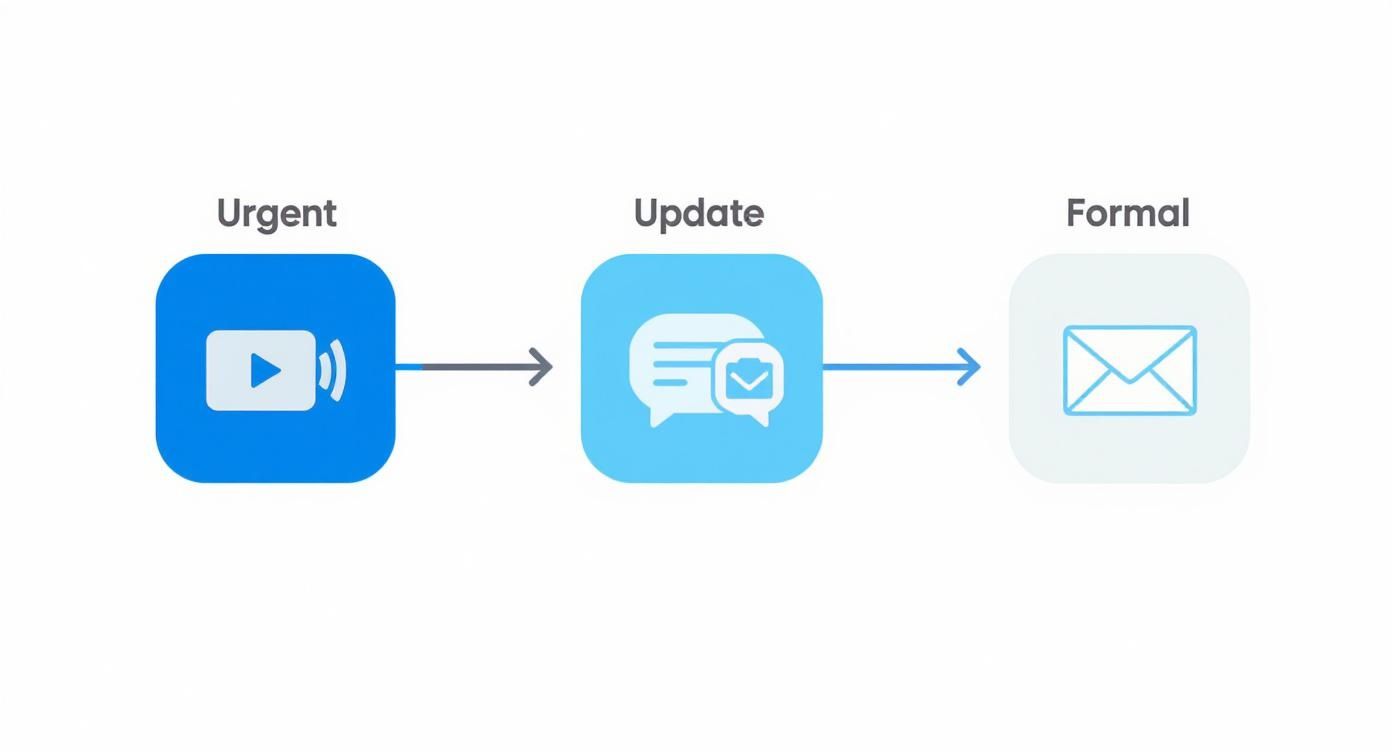
This simple guide helps your team decide when something needs a real-time call versus a quick message or an email, which is key to preventing a calendar full of unnecessary meetings.
Establish a Single Source of Truth
The absolute foundation of a solid remote workflow is a single source of truth (SSOT). Think of it as your team’s digital headquarters—one centralized, easy-to-access place where all vital project and company information lives. It’s the first spot anyone should look for an answer, whether they need a project brief, a process guide, or a final sign-off.
Tools like Notion or Confluence are built for this. By creating a central hub, you stop the painful, time-wasting hunt through old Slack threads and email chains just to find one piece of information. This is a game-changer for global teams where overlapping work hours are slim.
Let's say a product team is launching a new feature across three continents. The designer in Berlin finishes their work and uploads the final mocks to the project's Notion page. Hours later, the developer in Mumbai can grab them, see all the specs and feedback, and start coding without ever needing a live hand-off. The QA tester in San Francisco can then review the build against the exact requirements documented in the same place. See? No bottlenecks.
Document Everything That Matters
In a remote setup, if it isn't written down, it might as well have never happened. Undocumented processes are invisible to team members in different time zones. Intentional documentation is what fuels asynchronous work.
Don't panic—this doesn't mean you need to write a novel for every little task. Just focus on what’s essential:
- Key Processes: How do we handle bug reports? What’s the approval workflow for new ad copy? Writing down these standard operating procedures (SOPs) will save you and your team countless hours down the road.
- Meeting Decisions: After a meeting, someone needs to post a quick summary of what was decided and who’s doing what next. This keeps everyone on the same page, including those who couldn’t be there.
- Project Handoffs: A simple checklist or template for passing work between roles ensures crucial context isn't lost. This prevents the classic "what am I supposed to do with this?" moment.
The biggest mistake I see managers make is treating documentation as a one-and-done task. It's a living system. Encourage your team to continuously update documents as things change, making it a shared responsibility to keep your SSOT reliable.
Make Progress Visible to Everyone
Finally, successful distributed teams run on visibility. When you can’t physically see your colleagues working, you need another way to know what’s going on. This is where project management tools like Asana, Trello, or Jira are non-negotiable.
A shared project board gives everyone a real-time, at-a-glance view of the team’s progress. That visual clarity helps stop duplicate work, spot potential roadblocks early, and gives people a sense of shared momentum as cards move from "To Do" to "Done." To dig deeper into this, check out our guide on project management best practices for more strategies.
This kind of transparency builds trust and accountability without you having to micromanage. When progress is out in the open, you don't need to constantly ask for status updates. Instead, you can focus on what really matters: clearing obstacles for your team and celebrating their wins.
Building a Remote Team Culture That Actually Works
In an office, culture can feel like it just… happens. It's in the shared lunches, the inside jokes, and the quick chats by the coffee machine. But when your team is distributed, you can't leave culture to chance. It has to be built, intentionally and thoughtfully, with the same focus you’d give a critical project.
Forget the forced virtual happy hours. A truly great remote culture is built on a foundation of trust and psychological safety.

When your people feel safe enough to toss out a half-baked idea, ask a "dumb" question, or own up to a mistake without fear of being blamed, that’s where the magic happens. That's how a collection of individuals working from their homes becomes a genuinely cohesive team.
Engineer Moments for Real Connection
Those spontaneous "water cooler" moments are gone in a remote setup. You can't replicate them, but you can engineer new ways for your team to connect as people, not just as colleagues. This isn't about forcing fun—it's about creating consistent, low-pressure spaces for non-work chatter.
These little rituals become the social glue that holds your team together. They send a clear signal: you're more than just a name on a task board.
Here are a few ideas I've seen work wonders:
- A Dedicated Kudos Channel: Create a place in Slack or Teams just for celebrating each other. A
#propsor#shoutoutschannel makes appreciation public and encourages everyone to recognize the great work happening around them. - Structured "Coffee Chats": Use a tool like Donut to randomly pair up team members for a 15-minute chat each week. It’s a simple, automated way to build the cross-functional relationships that would never form otherwise.
- "Read Me" Guides: Have everyone write a personal "user manual" about themselves. How do they like to get feedback? What are their working hours? What's their communication style? This is a shortcut to building empathy and avoiding so many misunderstandings.
I once managed a conflict that started over a single, misunderstood Slack message. The sender was direct, and the receiver felt it was aggressive. By bringing them together to share their 'user manuals,' they realized one preferred blunt communication while the other valued softer language. It wasn't a conflict of personalities but a mismatch of styles, and that conversation turned a moment of tension into a foundation for stronger trust.
Run Meetings Where Everyone Feels Heard
Remote meetings can easily become a one-person show, with the same few voices dominating while others stay on mute. Your most important job as a remote manager is to be a facilitator, actively creating space for every single person to contribute. This is a cornerstone of psychological safety. If you'd like to learn more, our guide on what is psychological safety at work offers a deeper exploration.
Start by sending out an agenda with plenty of context before the meeting. This gives your introverts and internal processors time to gather their thoughts, leveling the playing field before the call even starts.
During the meeting itself, make a point of drawing out the quieter folks.
- Try a Round-Robin: When you need feedback, go around the virtual room and ask each person for their thoughts. This simple structure ensures no one gets overlooked.
- Use Anonymous Polls: For tricky subjects, tools like a Zoom poll or Slido are fantastic. They let you gather honest opinions without putting anyone on the spot.
- Have a "Parking Lot": Keep a shared doc open where anyone can "park" off-topic but important ideas. It shows their contribution is valued without derailing the meeting.
By being deliberate about how you build your culture and run your meetings, you create an environment where people feel seen, connected, and safe to do their best work. This isn't just a "nice-to-have"—it's a strategic advantage that unlocks your team's true potential.
Rethinking Onboarding and Performance
https://www.youtube.com/embed/TfOcbqjpRS8
How you bring a new person into the fold and measure success are two of the most critical parts of your job as a remote manager. It's so different from an office setting. In person, a lot of this happens through osmosis—your new hire learns by watching others, and you get a feel for performance just by being around.
When you’re remote, all of that disappears. You lose the default settings, which means you have to be far more deliberate.
A clumsy onboarding process can leave someone feeling completely adrift and disconnected before they’ve even had a chance to start. On the flip side, trying to measure performance with outdated metrics that track activity instead of actual results is a fast track to micromanagement and burnout. To really lead a remote team well, you have to build systems that prioritize clarity, connection, and impact from day one.
Designing a High-Touch Onboarding Experience
First impressions are a huge deal, especially when you can't just walk someone around the office. A great remote onboarding experience is so much more than just shipping a laptop on time. It's a carefully planned journey designed to make your new team member feel prepared, welcomed, and plugged into the company’s vibe.
Think about their first couple of weeks as a series of intentional touchpoints meant to build their confidence and help them form relationships. When you structure it this way, nothing falls through the cracks, and they can integrate into the team much more smoothly.
Here’s a practical checklist to get you started:
- Handle the pre-boarding details. About a week before they start, send a "welcome kit" with some company swag and all their equipment. Make sure you include a detailed schedule for their first week so they know exactly what to expect.
- Assign an onboarding buddy. This is a game-changer. Pair them up with a peer who isn't their direct manager. This buddy becomes their go-to for all the informal questions they might feel weird asking you about—things like communication norms or company inside jokes.
- Schedule key introductions. Don't just hand them an org chart. Set up a series of short, 15-minute intro calls with key people they'll be working with across different teams. This helps them start building their internal network right away.
Your main job during onboarding is to get rid of any and all ambiguity. A new remote employee should never have to wonder, "Who do I ask about this?" or "What am I supposed to be doing now?" A clear plan takes that anxiety away and lets them focus on learning.
For a deeper dive, our comprehensive guide on the remote onboarding process has even more strategies and templates you can put to use immediately.
Create a 30-60-90 Day Plan
For remote onboarding, a 30-60-90 day plan is absolutely essential. This document is their roadmap, plain and simple. It lays out clear, achievable goals for their first three months and helps them transition from learning the ropes to actively contributing and, finally, to taking real ownership.
- First 30 Days (Learning): The goal here is pure absorption. They should be focused on things like completing training modules, getting comfortable with your tech stack, and understanding key team processes.
- Next 30 Days (Contributing): Now, they start putting that knowledge to work. Goals could include tackling their first small project, actively contributing to a team meeting, or shadowing a colleague on a client call.
- Final 30 Days (Owning): At this stage, they should be working more autonomously. Goals should reflect this shift—maybe they're taking the lead on a specific task, proposing a process improvement, or managing a piece of a larger project on their own.
Shifting Performance Management to Outcomes
When your team is distributed, you can’t just glance around to see who's "working." Trying to manage by watching who is online is a recipe for disaster—it breeds micromanagement and crushes trust. The best remote managers I know have shifted their focus entirely from activity to outcomes.
Frankly, it doesn't matter if someone works a standard 9-to-5 or in focused bursts at midnight. What matters is the quality of their work and the impact it has.
This mindset is more important than ever. Remote work has opened the doors to hiring globally, and a recent report shows that over 50% of business leaders plan to increase their international hires. This means managers are juggling different time zones, labor laws, and cultural norms. Focusing on universal, outcome-based goals is the only way to ensure fairness and clarity across a team that might be spread all over the world.
The secret to making this work is setting crystal-clear expectations. A framework like OKRs (Objectives and Key Results) is perfect for this. The Objective is the big, ambitious goal (e.g., "Improve the customer onboarding experience"). The Key Results are the measurable metrics that tell you if you've actually hit that goal (e.g., "Reduce support tickets from new users by 15%").
Using a system like this gives your team the autonomy to figure out how they’ll hit their goals, which fosters a true sense of ownership and creativity. Your role changes from task-master to a supportive coach who clears roadblocks and has meaningful conversations during your one-on-ones.
Your Essential Remote Management Toolkit
Managing a remote team effectively isn’t about collecting the flashiest new apps. It’s about building a streamlined, integrated system that makes work simpler, clearer, and more visible for everyone. A bloated tech stack creates just as much noise as not having one at all.
Your goal is to create a digital headquarters. Every tool should have a specific job, eliminating guesswork and ensuring information flows smoothly without getting lost in the shuffle.
This curated list is designed to help you build that perfect tech stack, focusing on the core functions every successful remote team needs to master.
Project and Task Management Hubs
A solid project management tool is your non-negotiable single source of truth for all work in progress. It’s where you answer the crucial question: "Who is doing what, and by when?" This visibility is the key to building accountability and momentum without having to micromanage.
The right platform really depends on your team's DNA. A small, agile team might love a simple, visual tool, while a larger organization will need something with more horsepower.
- Asana: This is a fantastic all-rounder, especially for teams that need to see projects in multiple ways—from simple lists to timelines and Kanban boards. It makes cross-functional work incredibly transparent.
- Jira: Built from the ground up for software development, Jira is the standard for managing complex sprints, tracking bugs, and integrating directly into developer workflows.
Asynchronous Communication Channels
While real-time chat has its place, the real magic of remote work happens asynchronously. Your communication tools should protect your team's focus time, not constantly shatter it with notifications. The best platforms keep conversations organized, searchable, and easy to catch up on later.
- Slack: The undisputed champ for real-time chat, but its true value for remote teams comes from creating dedicated channels for specific projects or topics. This prevents conversations from turning into a chaotic free-for-all.
- Twist: This is an amazing alternative for teams feeling the burn from constant pings. Twist organizes every conversation into a thread from the start, making it async-first and much less demanding of immediate attention.
Your communication tool's primary job is to create clarity, not urgency. If every message feels like it needs an instant reply, you're not managing a remote team—you're managing a virtual call center.
Documentation and Knowledge Bases
In a remote team, if it isn't written down, it might as well not exist. A central knowledge base is the antidote to lost information, repeated questions, and knowledge hoarding. Think of it as your team’s collective brain, accessible to everyone, anytime.
This is where you house everything from onboarding guides and company policies to detailed project briefs and standard operating procedures. If you're looking for more options, our guide to the top remote team management software has you covered.
- Notion: Incredibly flexible and easy to use, Notion combines documents, databases, and project boards into one workspace. It’s perfect for building a highly customized, all-in-one hub.
- Confluence: As part of the Atlassian suite, Confluence is a more structured solution that’s ideal for larger teams needing powerful organization and tight integration with Jira.
Getting your toolkit right is a process of constant refinement. Start with these core categories, pick the tools that best match how your team actually works, and then—most importantly—create crystal-clear guidelines on how to use them.
To help you get started, here's a quick look at the essential tool categories and some top picks for each.
Essential Remote Team Management Tool Stack
| Category | Tool Examples | Primary Use Case |
|---|---|---|
| Project & Task Management | Asana, Trello, Jira | Tracking tasks, visualizing project timelines, and managing workloads. |
| Team Communication | Slack, Microsoft Teams | Real-time chat, channel-based discussions, and team announcements. |
| Documentation & Knowledge Base | Notion, Confluence, Google Workspace | Creating a single source of truth for processes, project docs, and company info. |
| Video Conferencing & Recording | Zoom, Google Meet, Loom | Synchronous meetings, 1-on-1s, and creating asynchronous video updates. |
| Collaborative Whiteboarding | Miro, FigJam | Virtual brainstorming, workflow mapping, and collaborative workshops. |
Ultimately, the best tools are the ones your team will actually use consistently. Don't be afraid to experiment, gather feedback, and adjust as your team's needs evolve.
Answering Your Toughest Remote Management Questions
As you get into the rhythm of leading a distributed team, you're bound to hit a few snags. It’s part of the process. This section tackles some of the most common hurdles managers face, with real-world advice to help you fine-tune your approach.
How Do You Keep Track of Productivity Without Becoming a Micromanager?
This is the big one. The secret is to stop focusing on activity and start focusing on outcomes. Watching green status dots or timing replies is a surefire way to kill trust and send your team spiraling toward burnout. Instead, give your people clear goals and the freedom to figure out how to get there.
Trust is everything in a remote setup. Here’s how you build it while still making sure the work gets done:
- Define "Done" Clearly: Use a simple framework like OKRs or SMART goals so everyone knows exactly what success looks like. When the finish line is clear, people can manage their own race to get there.
- Let the Work Speak for Itself: Your project management tool should be for tracking progress on actual tasks and deliverables, not for digital surveillance. Is the project moving forward? That’s the real story.
- Make 1-on-1s Count: Use your regular check-ins to talk about progress, yes, but more importantly, to ask "What's getting in your way?" This is your chance to remove roadblocks and offer support, not to hover.
When you shift your focus from the how and when to the what, you create a culture of ownership. That's the environment where high-performing remote teams truly shine.
What's the Best Way to Handle a Team Spread Across Multiple Time Zones?
When your team is scattered across the globe, you have to adopt an "async-first" mindset. It’s non-negotiable. This means building your workflows so they don’t rely on everyone being online at the same time. If progress constantly stalls because you're waiting for someone in another hemisphere to wake up, you’ve got a problem.
Make asynchronous communication your default. Of course, some meetings are unavoidable. When you have to schedule one, be fair about it—rotate the meeting times so the same few people aren't always stuck with the early morning or late-night call.
It can also help to establish a few "core collaboration hours" where everyone’s schedules overlap, but reserve that time for truly interactive work. The vast majority of tasks should be completable on their own time.
A single source of truth—like a meticulously organized Notion workspace or Confluence hub—is the linchpin that holds this all together. It ensures everyone has the same information, no matter when or where they’re working.
How Do I Prevent My Team From Burning Out or Feeling Isolated?
This requires real, intentional effort. The lines between the office and the living room are blurrier than ever, and it's on you as the manager to help your team draw them clearly.
Start by modeling good behavior. Set clear start and end times for your own workday, and respect your team’s hours by not sending messages late at night. In your 1-on-1s, go beyond project updates. Genuinely ask, "How is your workload feeling right now?" and "Are you actually managing to unplug?"
You can also schedule virtual get-togethers, like coffee chats or online games, but keep them completely optional. The goal is to offer a chance to connect, not to add another mandatory meeting to their calendar. For a deeper look at this and other related challenges, you can explore more topics on remote work for more great strategies.
Ready to supercharge your remote team's creativity? Bulby provides guided, AI-powered brainstorming exercises that ensure every idea is heard and developed, no matter where your team is located. Transform your virtual sessions from chaotic calls into structured, productive workshops. Learn more and get started with Bulby today!