
A check-in meeting is your team's regular, quick huddle. It’s designed to get everyone on the same page, uncover what’s blocking progress, and keep the momentum going. But it’s so much more than a status update—it’s the glue that builds connection and psychological safety when you’re not sharing an office.
Why Your Remote Check-In Meeting Matters More Than Ever

Let’s be real for a second. Most remote check-ins are a total missed opportunity. They either turn into a series of robotic status reports or meander into unstructured chats that leave everyone feeling drained and unproductive. In a remote world, these touchpoints aren't just a "nice to have"; they are the very connective tissue holding your team together.
When you lose the spontaneous office interactions—the quick chat by the coffee maker or the casual question over a desk partition—remote teams can easily drift into silos. A well-run check-in is your best defense against that isolation. It carves out a dedicated space for the kind of communication that builds real trust and clarity.
The shift to remote and hybrid work has completely changed how we communicate. The number of meetings has tripled since 2020, with the average employee now sitting through 10.1 virtual meetings every week. For remote teams, this reality brings both opportunities and headaches. A staggering 86% of global workers are in meetings with at least one remote colleague, and almost a third of all meetings now span multiple time zones. You can dive deeper into these meeting statistics and their impact.
Moving Beyond Simple Status Updates
A great check-in meeting isn't about micromanaging or tracking every minute of someone's day. It's about creating a communication rhythm that makes the entire team stronger. The goal is to shift from a transactional mindset ("What did you do?") to a truly collaborative one ("Where do you need help?").
Making this shift is a game-changer for a few key reasons:
- It Builds Psychological Safety: It creates an environment where people feel comfortable admitting they’re stuck or need help, without any fear of being judged.
- It Encourages Proactive Problem-Solving: When you surface blockers early, the team can jump on issues before they completely derail a project.
- It Strengthens Team Cohesion: These regular, human-centered moments remind everyone they’re part of a supportive team, not just a collection of individuals working alone.
Think about it this way: A "status update" feels like an interrogation. A well-run check-in feels like a team huddle, where everyone aligns on the next play. It's about looking forward together, not just reporting on what's already done.
Imagine a team where the check-in is just a dry list of completed tasks. An engineer says they're working on a bug. The meeting moves on.
Now, picture a different team. The facilitator asks, "What's your biggest hurdle with that bug?" The engineer admits it's way more complex than they first thought. Immediately, two other team members who've tackled similar problems jump in with ideas.
That’s the difference. That’s the power you unlock when you transform your check-in meeting from a chore into a catalyst for collaboration, keeping your team aligned and energized, no matter where they are.
Setting the Stage for a Successful Check-In

The best check-in meetings start long before anyone clicks the "Join Call" button. What separates a focused, high-energy session from a meandering conversation is the prep work you do beforehand. This isn't about creating more red tape; it's about respecting everyone's time and setting the team up for a genuine win.
It all starts with a single, sharp objective. A meeting without a clear purpose is just a scheduled distraction. Before you even think about an agenda, you have to be able to finish this sentence: "By the end of this check-in, the team will have…"
That clarity is your North Star. It guides every other decision you make.
Craft an Agenda People Will Actually Use
Once your objective is clear, the agenda is your roadmap. We've all seen vague, overloaded agendas that are a recipe for disaster. A good one is concise, outcome-oriented, and shared at least 24 hours in advance. This gives people a chance to actually read it, gather their thoughts, and add their own points if needed.
I like to think of a good agenda as a menu—it tells attendees what to expect so they can come ready to engage. A bad agenda is like being told "we have food" and just hoping for the best.
Here’s what makes an agenda really work for a remote check-in:
- Make it action-oriented. Instead of a lazy "Discuss Project X," write "Decide on next steps for Project X launch." The language should be about verbs and outcomes.
- Timebox everything. Give each topic a realistic time limit. It creates a shared responsibility to keep the conversation from drifting.
- Assign owners. Put a name next to each agenda item. This makes it crystal clear who is leading that part of the discussion and needs to come prepared.
A well-crafted agenda isn't just a list of topics; it's a contract with your team. It promises that their time will be used wisely to solve specific problems and make clear decisions.
For a weekly sync, this could look like a 10-minute slot for "Review Key Metrics (Lead: Sarah)" followed by a 15-minute slot for "Brainstorm Solutions for Customer Feedback Blockers (Lead: David)." That structure alone brings immediate focus.
Define Roles and Set Clear Expectations
Ambiguity is the enemy of engagement, especially in a remote setting. Assigning a few simple roles helps the check-in meeting run like a well-oiled machine and keeps everyone tuned in.
- The Facilitator: This person isn't just the boss; they guide the discussion, watch the clock, and make sure everyone sticks to the agenda. It’s a great role to rotate among team members to help them build their own leadership skills.
- The Notetaker: This person’s job is crucial. They capture the key decisions, action items, and important takeaways, creating a single source of truth for everyone after the call.
Setting expectations is just as important. Tell people what they need to do before the meeting. Do they need to come with a specific update? Is there a document they absolutely must review?
When you spell this out, you empower your team to show up ready to contribute from the first minute. This kind of thoughtful prep is a cornerstone of a healthy meeting culture, and you can find more strategies in our guide on preparing for a meeting. Ultimately, this setup turns your remote check-in from just another block on the calendar into a powerful tool for alignment and progress.
How to Facilitate an Engaging Remote Meeting
Once you’ve done the prep work, it’s time to turn that plan into a great experience. This is where the magic happens. Your role as a facilitator isn't about being a boss; it’s about being a guide. You're there to steer the conversation, making sure it’s productive, inclusive, and maybe even a little energizing. The goal is to move beyond a passive listening session and create a genuinely collaborative discussion.
It all starts in the first sixty seconds. Seriously. The way you kick things off sets the tone for everything that follows. Forget the robotic, "Okay, let's get started." You need a human touch that immediately pulls people in and sets a positive mood.
Kick Off with Intention
A powerful opening can completely reset the energy, especially if your team is jumping from back-to-back calls. I've found that a simple, non-work-related question works wonders to break the ice and get everyone mentally in the room.
Try starting with a quick round-robin question. Something like:
- "What’s one small win you’ve had this week, personal or professional?"
- "Share one thing you're looking forward to this weekend."
- "What's one new thing you learned recently?"
This small act does so much. It shifts everyone's focus, forces active listening from the get-go, and reminds the group they're a team of people, not just a grid of job titles on a screen. It’s a simple way to build psychological safety, making people far more willing to contribute when you dive into the real agenda.
Guide the Conversation Like a Pro
After setting a positive tone, your main job is to keep the conversation on track without killing its momentum. It’s a real balancing act. You have to be the guardian of the agenda and the clock while also leaving room for those valuable, organic discussions to happen.
When a conversation starts to drift—and it will—don't just shut it down. Acknowledge the point and gently redirect. You could say something like, "That's a really interesting point, and I want to make sure we give it the attention it deserves. Let's pop it in our 'parking lot' to discuss after this meeting so we can stick to our current topics."
This "parking lot" method is your best friend. It’s just a spot in your meeting notes for important but off-topic ideas. It validates the speaker’s contribution while respecting everyone else’s time. If you want to dive deeper, you can explore other meeting facilitation techniques to really sharpen your skills.
The best facilitators don't control the conversation; they conduct it. They know when to let a topic breathe and when to gently nudge it forward, ensuring every minute serves the meeting's core purpose.
Ensure Everyone Has a Voice
In any group, you'll have people who naturally talk more and others who are quieter. This difference can get even bigger in a remote setting. Your goal is to create an atmosphere where every single person feels they can share their perspective.
You have to actively draw people into the conversation. If you notice someone hasn't spoken in a while, use a friendly, low-pressure prompt to invite them in.
Here are a few inclusive prompts I use:
- "Maria, you have a lot of experience in this area. What are your initial thoughts on this?"
- "James, I'd love to get your perspective. Does this align with what you're seeing on your end?"
- "Before we move on, does anyone who hasn't spoken yet have a different viewpoint to share?"
This isn’t about putting people on the spot. It’s about explicitly creating an opening for them. Often, quieter team members have brilliant insights but are just waiting for the right moment to jump in. Your job as the facilitator is to create that moment for them.
Having the right tools helps, too. The best video conferencing software often includes features like polls or a hand-raising function that make participation easier. By intentionally managing participation, you get better ideas and build a much more cohesive, respectful team.
Practical Check In Meeting Agenda Templates
A generic agenda leads to a generic meeting—it's that simple. If you want your check in meeting to actually make a difference, you need to build it around a specific purpose. After all, the goals of a daily huddle are worlds apart from a weekly strategic sync, and your agenda has to reflect that reality.
Without the right framework, even a meeting with the best intentions can quickly turn into an unstructured chat that leaves everyone wondering why they bothered showing up. The trick is to match the agenda to the outcome you're aiming for. This ensures every minute spent together actually moves the team forward.
Let's walk through three battle-tested templates you can steal and adapt for your own remote team's rhythm.
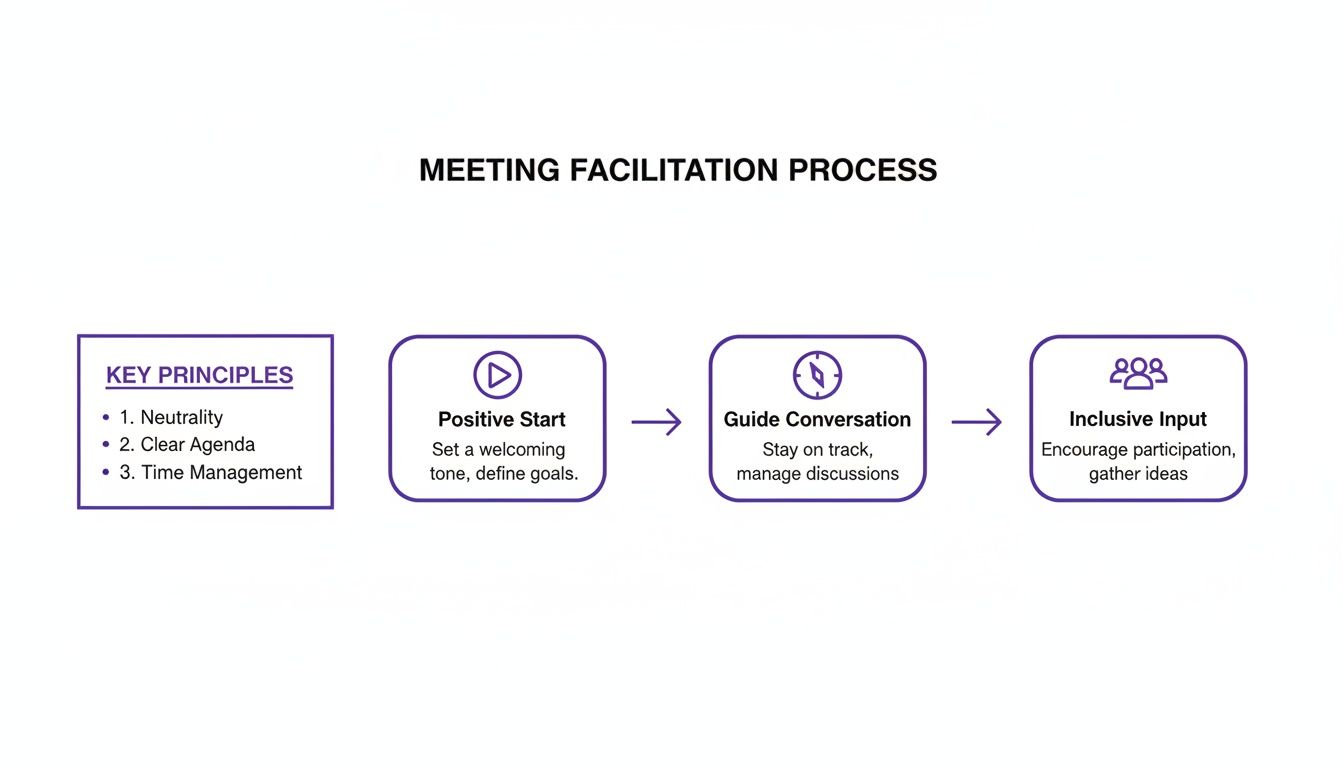
As you can see, great facilitation isn't magic. It starts with setting a positive tone, actively guiding the conversation, and then making sure everyone gets a chance to contribute. This mindset is the foundation for making any of these agendas work.
To help you choose the right structure, here's a quick comparison of the three main types of check-in meetings.
Remote Check In Meeting Agenda Templates
| Meeting Type | Purpose | Suggested Timing | Key Questions/Prompts | Ideal Outcome |
|---|---|---|---|---|
| Daily Stand-Up | To quickly sync on progress, surface immediate blockers, and align on daily priorities. | 10-15 minutes | What did you do yesterday? What will you do today? Any blockers? | Clarity and immediate action. Blockers are identified and addressed right away. |
| Weekly Team Sync | To review progress against goals, solve larger challenges, and set strategic priorities for the week. | 45-60 minutes | Wins, KPI review, problem-solving, weekly priorities, action items. | Strategic alignment. The team leaves with a clear, shared mission for the week ahead. |
| Asynchronous Check-In | To maintain alignment and connection for teams across different time zones without live meetings. | Daily or a few times per week | Update on progress, blockers (tagging relevant people), kudos for teammates. | Continuous connection. Everyone stays in the loop, regardless of their schedule. |
Each of these formats serves a distinct need, from high-speed daily updates to more thoughtful weekly planning. Let's dig into the details of how to run each one effectively.
The Lean Daily Stand-Up Agenda
The daily stand-up is all about one thing: momentum. This meeting is your team's quick, focused, and forward-looking huddle to clear the path for the day. The biggest mistake I see teams make is letting this turn into a long-winded reporting session where everyone just talks at each other.
Keep it under 15 minutes, period. I even encourage my teams to stay standing (yes, even at home on a video call!) because it’s a physical reminder to be concise.
- Purpose: Quickly sync on progress, identify immediate blockers, and align on the day's priorities.
- Key Prompts:
- What did I accomplish yesterday to move our goals forward? (Focus on impact, not a laundry list of tasks.)
- What will I focus on today to make the biggest difference?
- What’s standing in my way? (This is the most critical question—it’s where the team can actually help.)
The goal here is clarity and immediate action. As soon as a blocker is mentioned, the next step is to figure out who can solve it. That usually means a quick follow-up conversation after the stand-up with only the necessary people.
The Strategic Weekly Team Sync Agenda
While the daily is tactical, your weekly check-in is strategic. This is your chance to zoom out from the day-to-day grind and look at the bigger picture. Use this time to review progress against your quarterly goals, tackle larger challenges as a group, and make sure everyone is rowing in the same direction.
- Purpose: Review weekly progress, solve bigger-picture problems, and align on upcoming priorities.
- Timing: Set aside a good 45-60 minutes.
- A Simple, Effective Structure:
- (5 mins) Wins & Highlights: Kick things off on a high note. Go around the room and share a win from the past week. It builds great energy.
- (10 mins) KPI & Goal Review: Glance at the team's key metrics. Are we on track? What are the numbers telling us?
- (20 mins) Blockers & Brainstorms: This is the heart of the meeting. Team members bring thorny challenges to the table for collaborative problem-solving.
- (10 mins) Priorities for the Week: Based on the discussion, agree on the top 1-3 priorities for the week ahead.
- (5 mins) Action Items & Wrap-Up: Recap decisions and assign clear action items with owners and due dates. No ambiguity.
This approach turns a boring status report into a forward-looking strategy session. The focus shifts from just listing problems to solving them together.
The Flexible Asynchronous Check-In Format
What about teams spread across time zones where a live meeting is a nightmare to schedule? An asynchronous check-in can be just as powerful, if not more so, when done right. It keeps everyone connected and aligned without forcing someone to join a call at 10 PM.
Need more inspiration? We've compiled a whole list of other examples of agenda templates you can explore.
- Purpose: To share updates, surface blockers, and maintain team connection across different time zones.
- Timing: This can be done daily or 2-3 times per week, depending on your team's pace.
- The Process:
- Create a dedicated channel: Use a specific Slack or Teams channel (like
#team-updates) to keep things organized. - Set a clear deadline: Ask everyone to post their update by a certain time, like 10 AM in their local time zone.
- Use a consistent format: Have everyone answer the same simple prompts in every post.
- Create a dedicated channel: Use a specific Slack or Teams channel (like
Here are some prompts that work well:
- Update: A quick summary of your progress and any key learnings.
- Blocker: Clearly state any obstacles and be sure to @tag the people who can help you.
- Kudos: Give a shout-out to a teammate who helped you out or did something awesome.
That "Kudos" prompt is more important than it looks. In a remote setup, it's a small but powerful way to build morale and make sure people feel seen. The goal is to create a living log of the team's progress that everyone can catch up on when it works for them.
Getting Your Remote Meetings Back on Track
Even the most well-planned check-in meeting can go sideways. It happens to everyone. Whether you’re dealing with chronic lateness or the dreaded awkward silence, the good news is that most of these common headaches are fixable. Think of this as your field guide for spotting and solving the problems that suck the life out of your remote calls.
Instead of seeing these issues as failures, treat them like data. They’re pointing out the weak spots in your process, giving you a perfect opportunity to make things better. The trick is to tackle these problems head-on before they become a permanent part of your team's culture.
The stats paint a pretty clear picture of where things go wrong. A shocking 69% of workers admit they’re checking emails during meetings, and 63% of employees feel their meetings are getting way too crowded. But there's hope! One consultancy saw team collaboration shoot up by 42% and overall performance rise by 28% just by redesigning their meeting habits. You can see more about these meeting statistics and trends.
The Meeting That Never Ends on Time
This is probably the most common—and annoying—issue. When a meeting constantly runs over, it’s a symptom of a bigger problem. Either your agenda is unrealistic, or nobody is steering the ship. This creates a domino effect, pushing back everyone's schedule and building resentment.
The fix? Get ruthless with your agenda. Is it actually possible to cover all that in 30 minutes? Probably not. Cut it down to the two or three things that absolutely must be discussed.
It also helps to assign a dedicated timekeeper. This person’s sole job is to give gentle reminders, like, "Heads up, we have about five minutes left on this topic." It creates a sense of shared responsibility and keeps things moving.
The Conversation Hijacked by a Few People
In a remote call, it's incredibly easy for a couple of outgoing people to take over the conversation, leaving others to fade into the background. This is a huge problem because it starves the team of different viewpoints and makes quieter team members feel like their ideas don't matter. A great check-in needs everyone to participate.
The solution here is all about structure. Instead of throwing out a vague question to the whole group, try a round-robin format. Go around the virtual room and give each person a minute or two to share their take on a specific point. This ensures every single person gets a chance to speak.
A facilitator's role is more than just leading a discussion; it's about making sure that discussion is inclusive. Actively making room for quieter people isn't just nice—it’s how you get to smarter, more well-rounded decisions.
If your team is feeling drained, looking into strategies for reducing meeting fatigue can make your check-ins feel less like a chore and more like a valuable use of time.
The Tangents That Kill the Agenda
A passionate debate is a good thing, but when the conversation veers completely off-topic, it can derail the entire meeting. These tangents usually come from a good place—someone has a great idea or a valid concern—but they still need to be managed.
This is where the "parking lot" comes in handy. When someone brings up a valuable but unrelated point, acknowledge it and literally "park" it in a dedicated spot in your shared notes.
You could say something like, "That's a fantastic point, Alex, and it deserves its own discussion. I'm adding it to our parking lot so we can either circle back at the end or tackle it in a separate chat." This makes the person feel heard without letting the agenda get hijacked.
The "So… What Now?" Ending
You’ve had what feels like a great discussion, but then everyone logs off and… nothing changes. This is the ultimate sign of a failed meeting. A check-in without clear next steps is just a conversation, not a driver of progress. This often boils down to a lack of clarity, a topic we explore more in our guide on how to overcome communication barriers.
To fix this, make it a non-negotiable rule to spend the last five minutes of every meeting recapping decisions and assigning action items.
- What is the task? (Be super specific.)
- Who owns it? (Assign it to a single person.)
- By when? (Give it a deadline.)
Put these in your shared notes and send them out right after the call. This one simple habit builds a culture of accountability and ensures your check-in actually gets things done.
Got Questions About Remote Check-Ins? You're Not Alone.
Even with the best game plan, running remote check-ins in the real world can get tricky. What works for a five-person startup will probably fall flat in a 20-person department. Every team is different.
Let's dive into some of the most common questions managers have when they're trying to nail down their remote meeting rhythm. Think of this as your practical field guide for moving from theory to reality.
How Often Should We Actually Be Meeting?
There's no magic number here. The right frequency really boils down to how intertwined your team's work is.
For a fast-moving dev team knee-deep in a sprint, a quick 15-minute daily stand-up is often essential to knock down blockers and keep things flowing. But for a marketing team focused on longer-term projects, a daily check-in would just feel like noise. They'd get a lot more out of a focused 45-minute weekly sync to align on goals and plan the upcoming week.
The golden rule? Don't meet just for the sake of meeting.
A check-in meeting should be a tool, not a tradition. If it isn't actively helping your team move forward, it's time to re-evaluate its frequency or format.
My advice is to start with a weekly meeting and then ask your team directly. A simple "Is this helping you or just clogging your calendar?" can give you all the feedback you need. Be ready to adjust based on what they say.
My Team is Huge. How Do I Run a Check-In That Isn't a Total Snooze-Fest?
Yeah, once you get past eight or ten people, the classic round-robin update is dead on arrival. It just turns into a long, boring reporting session where everyone tunes out until it's their turn to talk. To make it work with a larger group, you have to get creative.
- Use Breakout Rooms: Split everyone into smaller groups of 3-4. Let them have a real conversation about their updates and challenges. Then, have one person from each group report the highlights back to the main room. This keeps everyone talking and engaged.
- Flip the Script with a "Read-Ahead": This is a game-changer. Have everyone post their updates in a shared doc or Slack channel before the meeting. Then, use your precious live time to focus only on the big stuff—the critical blockers or complex problems that need the whole group's brainpower.
This approach respects everyone's time by handling the simple information sharing asynchronously. The meeting itself becomes a high-value collaboration session.
How Do I Stop My Check-In from Feeling Like Just Another Status Update?
This is the big one. You want your check-in to be a launchpad for the week ahead, not a rearview mirror. The secret is to shift the focus from reporting what's done to solving what's next.
Start by ditching "What did you do?" and try asking better questions. If you're looking for inspiration, we've got a whole list of powerful check-in meeting questions you can steal.
Try prompts like these:
- "What's one thing you learned this week that the rest of us should know?"
- "Where are you feeling stuck, and who on this call might be able to help?"
Another great tactic is to carve out a dedicated "Blockers & Brainstorms" slot on the agenda. This creates a predictable, safe space for people to bring up challenges and get help from their teammates without feeling like they're derailing the meeting.
And finally, always kick things off with a round of "wins." Starting with quick highlights or shout-outs injects positive energy and reinforces a culture of appreciation. It's a small tweak that helps turn a routine update into a session where the team genuinely helps each other win.
Ready to transform your team's brainstorming sessions from unstructured chats into powerful idea-generating engines? Bulby provides the guided structure and AI-powered exercises you need to unlock creative solutions. See how Bulby can make your next collaborative session your most productive one yet at https://www.bulby.com.