
A design research methodology is really just a structured way of figuring out what your users need, how they behave, and what makes them tick. Think of it as your game plan for gathering real-world evidence, so you can build products that solve actual problems for actual people.
What Is Design Research and Why It Matters
Ever seen a product that was a technical marvel but a total flop? It probably happened because the creators built something based on what they thought people needed, without ever really checking. Design research is your insurance policy against that kind of guesswork. It’s the structured investigation that gets to the heart of why people do what they do.
This whole process shifts product development from being driven by assumptions to being guided by facts. It's a cornerstone of human-centered design, making sure the user is always the focus of every decision. With a solid research foundation, your entire team gets on the same page, which cuts down on costly rework and keeps everyone focused on building features that truly matter. You can see how this fits into the bigger picture by exploring the design thinking process steps.
The Foundation of Modern Research
This idea of a systematic, structured approach to research has been around for a while. In fact, a lot of the statistical backbone for modern experimental design was put in place back in the 1920s and 1930s by Sir Ronald Fisher. His work on principles like randomization and replication turned research from a gut-feel exercise into a disciplined science.
It's this legacy of rigor that gives today's design research methodology its power. It provides teams with a reliable framework for making sense of the often messy and complex world of human behavior.
A design research methodology is not about finding the right answer; it's about asking the right questions to uncover deep insights and reduce uncertainty in the design process.
The Two Core Lenses of Research
Fundamentally, design research looks at the user’s world through two distinct but complementary lenses:
- Qualitative Research: This is all about the why. It digs deep into people's motivations, feelings, and personal stories through methods like in-depth interviews and observation. You get rich, narrative context that numbers alone can't provide.
- Quantitative Research: This is about the what and how many. It uses numerical data from things like surveys and analytics to spot trends and validate ideas at scale. This gives you the statistical proof to back up your decisions.
By blending both qualitative and quantitative insights, you get a much fuller, more three-dimensional understanding of your users. This prevents you from making big decisions based on a single data point and helps you build a more robust strategy. As technology pushes boundaries, it's also important to understand the evolving landscape of AI, including Agentic AI, which is constantly shaping how we gather and interpret user data.
Choosing Your Qualitative and Quantitative Toolkit
Every research project needs the right tools for the job. Think of it like a builder's toolbox: you can't build a house with just a hammer, and you wouldn't use a sledgehammer to hang a picture frame. The same principle applies here. Your two main categories of tools are qualitative and quantitative methods, and knowing when to use each is the mark of a pro.
Qualitative methods are your close-up lens. They’re for digging into the rich, sometimes messy, human side of an experience. This is all about getting to the “why” behind what people do—their feelings, motivations, and the little details of their daily lives. You’ll end up with stories, not spreadsheets.
Quantitative methods, on the other hand, are your wide-angle lens. They let you zoom out to see the big picture: broad patterns, trends, and statistically significant relationships. This approach is all about the "what," "where," and "how many," giving you hard numbers to measure and analyze. It’s what gives you the scale and confidence to back up your assumptions.
Before we dive into specific methods, let's quickly compare the two approaches side-by-side.
Qualitative vs Quantitative Design Research Methods
| Aspect | Qualitative Research | Quantitative Research |
|---|---|---|
| Primary Goal | To understand why and explore user motivations, feelings, and context. | To measure what and how many, and validate hypotheses with numbers. |
| Data Type | Descriptive, observational, narrative (e.g., quotes, stories, notes). | Numerical, measurable, statistical (e.g., ratings, percentages, metrics). |
| Sample Size | Small (typically 5-15 participants) to allow for deep exploration. | Large, to ensure statistical significance and generalizability. |
| Common Methods | User interviews, usability testing, field studies, focus groups. | Surveys, A/B testing, web analytics, polls. |
| Key Question | "Why are users dropping off at the payment screen?" | "How many users are dropping off at the payment screen?" |
This table gives a high-level view, but the real magic happens when you know how to blend these approaches together to tell a complete story.
Uncovering the Story with Qualitative Methods
When you really need to get inside your users' heads, qualitative research is where you start. It’s less about counting and more about connecting with people. The sample sizes are intentionally small because the goal is to go deep, not wide.
Some of the most tried-and-true qualitative methods include:
- User Interviews: A simple one-on-one conversation is still one of the most powerful research tools we have. It’s your chance to ask follow-up questions and really dig into a user’s world. Getting good at asking open-ended questions in research is the key to unlocking rich, honest insights here.
- Usability Testing: This is where you watch real people try to use your product or prototype. You see where they get stuck, hear their frustrations in real-time, and pinpoint exactly where the design is failing them. It’s less about asking and more about observing.
- Field Studies (Ethnography): For this, you go to your users—observing them in their natural habitat, whether that's their office, their home, or on the go. This gives you incredible context, revealing workarounds and habits you’d never, ever discover in a controlled lab setting.
These methods give you a mountain of non-numerical data like interview transcripts, sticky notes, and powerful user quotes. Your job is to sift through it all to find the themes and patterns that tell a compelling story about the user experience.
Measuring the Patterns with Quantitative Methods
When you need to back up those stories with hard numbers or see if a problem affects a lot of people, you turn to quantitative methods. This approach brings an objective, measurable lens to your work and is perfect for validating hypotheses that pop up during your qualitative discovery.
Key quantitative methods you'll use often are:
- Surveys and Questionnaires: These are fantastic for gathering a lot of data from a large audience without a huge time investment. You can measure satisfaction, gauge interest in new features, or collect demographic info.
- A/B Testing: This is a classic controlled experiment. You show two (or more) different versions of a design to different groups of users and see which one performs better on a specific metric, like click-through rates or sign-ups. It gives you clear statistical proof to guide your decisions.
- Web Analytics Review: Tools like Google Analytics are a goldmine of quantitative behavioral data. You can track page views, bounce rates, time on page, and user flows to find out exactly where people are getting stuck or leaving your site.
The real power of a strong research practice isn't in picking one camp over the other. It's in knowing how to weave them together to build an airtight case for your design decisions.
A qualitative insight might give you a hypothesis (e.g., "I think users are getting lost in our checkout flow"), while quantitative data can prove it at scale (e.g., "45% of users drop out of the funnel at this exact step").
When you have both the "why" and the "what," you have everything you need to make truly user-centered decisions. For a great list of specific tools and templates that support these methods, check out Refact's Toolkit.
How to Select the Right Research Method
Having a big toolbox of research methods is one thing; knowing which tool to pull out for the job is a completely different skill. Choosing the right design research methodology isn’t about picking the most popular or complicated option. It's about being strategic and aligning your approach with your project's specific goals, timeline, and current stage.
Think of it like being a doctor. You wouldn't order an MRI for a patient with a simple cold. You'd start by asking questions to understand their symptoms first. In the same way, your research should always kick off with a single, focused question that guides your entire strategy.
This decision tree helps visualize that first big choice you’ll need to make.
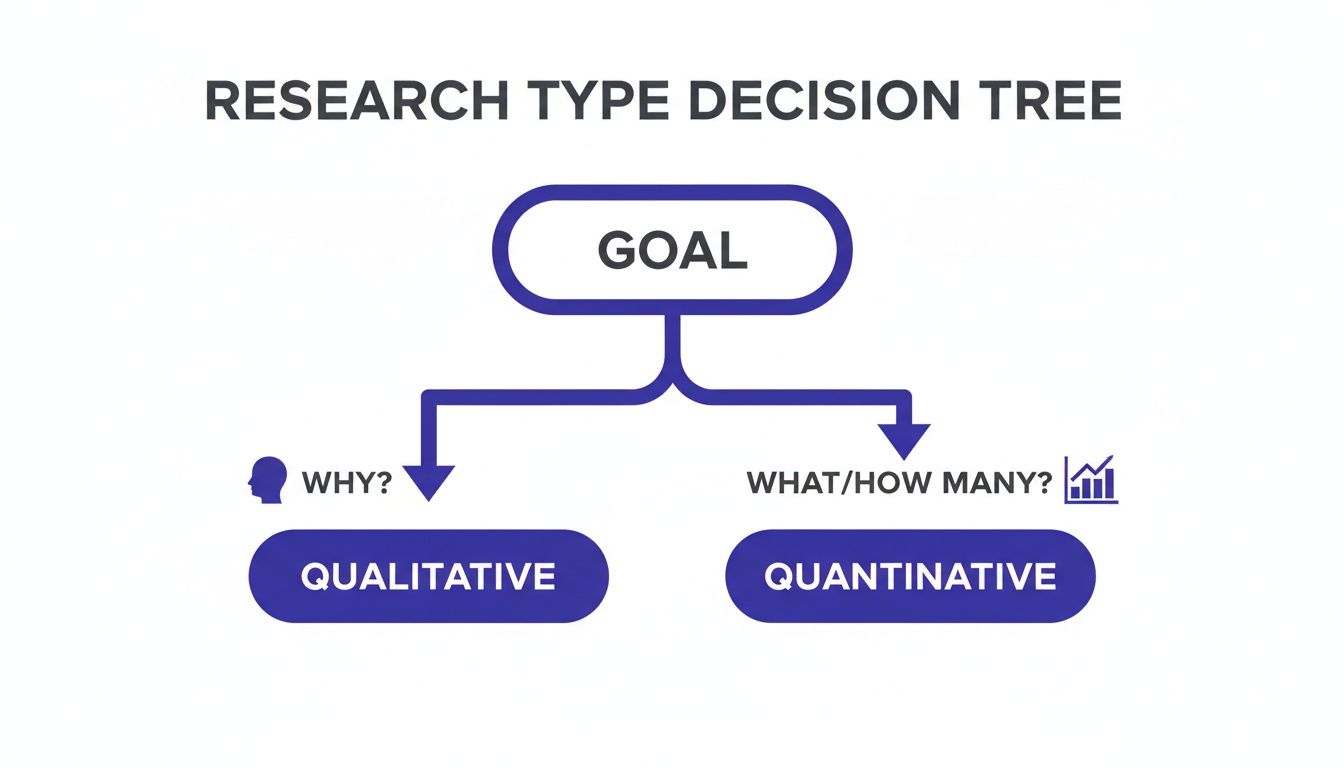
Ultimately, your choice boils down to a simple question: do you need to understand the why behind people's behavior, or do you need to measure the what and how many?
Matching Methods to Product Development Stages
The kind of research you need will naturally change as your product grows up. A method that gives you game-changing insights during the early discovery phase might be totally wrong when you're trying to optimize a live product.
Let's break down which methods fit best with the typical product lifecycle.
-
Discovery Phase (Early Concept): Right at the beginning, you're just exploring problems and looking for opportunities. The goal is to deeply understand what users need. Qualitative methods like in-depth user interviews and ethnographic field studies are your best friends here. You’re building empathy, not validating stats.
-
Validation Phase (Prototyping): You've got an idea, and now you need to figure out if it has legs. This is where you test your concepts and prototypes. Usability testing (qualitative) is brilliant for finding flaws in your design, while surveys (quantitative) can help you gauge how much interest there is in a new feature.
-
Launch and Optimization Phase (Live Product): Once the product is out in the wild, your focus shifts to making it better. A/B testing (quantitative) gives you hard data on which design performs best, and digging into analytics reviews helps you spot user behavior patterns at a massive scale.
A classic mistake is using a validation method when you're still in the discovery phase. Sending out a survey asking users what features they want usually just leads to safe, boring ideas. Real innovation comes from observing what people do and uncovering the needs they can't even tell you about.
Key Questions to Guide Your Decision
Before you commit to a specific method, get your team in a room and hammer out the answers to these questions. They'll act as your compass, pointing you toward the most effective approach.
-
What is our primary goal? Are we trying to explore a new problem, or are we trying to evaluate a solution we’ve already designed? Exploration requires open-ended qualitative methods, while evaluation usually calls for more structured, measurable techniques.
-
What kind of data do we need? Are we after rich stories and emotional context (qualitative), or do we need hard numbers and statistical proof (quantitative)? Answering this one question will immediately cut your list of potential methods in half.
-
What are our constraints? Let's be real. How much time, money, and access to users do we actually have? A multi-week ethnographic study might be the dream, but it's not going to happen in a two-day sprint.
This kind of structured thinking has deep roots in the scientific community. The Design of Experiments (DOE) methodology, which really took off in the mid-20th century, changed the game by creating a formal process for testing variables. Major milestones, like the introduction of Response Surface Methodology in 1951, gave researchers sophisticated ways to see how different factors work together. You can read more about the evolution of experimental design on Wikipedia.
Combining Methods for a Fuller Picture
Often, the most powerful insights don't come from a single method but from mixing and matching them.
For example, you could start with a few focus groups to get some initial gut reactions to a new concept. If you want to dive deeper, check out our guide on how to conduct a focus group.
Then, you could follow up with a large-scale survey to see if the themes that came up in your small group discussion hold true for your entire user base. This blend gives you both the compelling "why" from the stories and the confident "how many" from the data, building an undeniable case for your design decisions.
Your Step-By-Step Design Research Playbook
Knowing all the different research methods is one thing, but actually turning that knowledge into a repeatable process is what truly separates great teams from the rest. This playbook breaks down the entire design research methodology into five clear steps, giving you a reliable roadmap for any project, no matter its size.
Think of this as your project’s nervous system—a structured process that connects every single action back to a central goal.
Whether your team is all in one room or spread across the globe, following a clear sequence makes sure your research is efficient, organized, and ultimately leads to real impact. It gets rid of that "what do we do next?" feeling and helps everyone contribute in a meaningful way.
Step 1: Define Your Core Questions
Before you even dream of writing a survey or scheduling an interview, you have to get crystal clear on what you need to learn. Every research project has to start with a focused question. A vague goal like "understand our users" is a recipe for vague, useless data.
Instead, frame your objective with a specific, answerable question. For example, rather than a broad goal, ask something sharp: "Why are 70% of new users abandoning their shopping carts on the payment page?" This kind of focus will guide every decision you make from here on out, from who you talk to, to what you ask them.
A great research question is:
- Specific: It zooms in on a particular behavior, user group, or feature.
- Actionable: The answer should give you a clear direction for a design or business decision.
- Feasible: You can realistically find the answer with the time and resources you actually have.
Step 2: Choose Your Method and Find Your People
Once you have your core question locked in, it's time to pick the right tools for the job. Go back to that discovery versus validation framework we talked about. Are you exploring a problem from scratch or are you testing a solution you've already built? This is the key decision that will point you toward either qualitative methods (like interviews) or quantitative ones (like A/B tests).
At the same time, you need to figure out who you’re going to talk to and how you'll get them. Your research is only as good as your participants. If your question is about first-time users, talking to your most experienced power users will just lead you astray.
The goal isn't to find a random sample of people, but a representative sample of your target user segment. Bad recruiting is one of the fastest ways to completely undermine your findings.
Step 3: Prepare Your Research Tools
This step is all about logistics. It’s where you create the actual materials you'll use to gather data in a consistent and ethical way. Getting this right is critical for ensuring every participant has a similar experience, which makes your data much easier to compare and analyze later.
Depending on the method you chose, your prep checklist might look something like this:
- Interview or Usability Test Script: Write out your key questions, tasks, and prompts. You should absolutely allow for natural conversation, but a script is your safety net to make sure you cover all the important ground with everyone.
- Survey Questionnaire: Craft questions that are clear and unbiased. Be careful to avoid leading questions that subtly nudge users toward a particular answer.
- Prototypes: Make sure your prototype is polished and works reliably for the tasks you plan to test.
- Consent Forms: Don't skip this! Always prepare a straightforward consent form that explains what the study is for, how the data will be used, and confirms the person is participating voluntarily.
Step 4: Gather Your Data
With all your prep work done, it's go-time. During this phase, your main job is to be a neutral, objective listener. Whether you're in an interview or just watching someone use a prototype, your goal is to understand their perspective without coloring it with your own opinions.
For remote teams, this step is powered by digital tools. Video conferencing software with recording is a must for interviews, while other specialized platforms can help with remote usability tests and surveys. A crucial part of the process is to conduct user research in a way that makes people feel at ease, because that's when you get the most honest feedback.
It's also a great habit to hold a quick debrief with any teammates observing after each session. This helps capture everyone's immediate thoughts and initial takeaways while they’re still fresh.
Step 5: Turn Insights into Action
Collecting data isn't the finish line; it’s really just the halfway point. Raw data—like interview transcripts or survey results—isn't the same thing as an insight. The final, and arguably most important, step is to sift through all that information to find meaningful patterns and turn them into concrete recommendations.
This means grouping similar observations, spotting recurring themes, and tying everything back to your original research question. Your final output shouldn't be a dry list of facts. It should be a compelling story, backed by user evidence, that clearly explains what you learned and what the team needs to do next.
A powerful insight directly sparks a specific design change or a new strategic direction, making your research a true engine for improving the product.
Common Design Research Pitfalls and How to Avoid Them
Even with a rock-solid plan, research can hit some nasty snags. These aren't obscure academic theories; they're common-sense traps and sneaky biases that can trip up even seasoned pros.
Spotting these pitfalls ahead of time is half the battle. If you don't, you risk derailing the entire project with bad data, leading your team down a path that doesn't actually solve your users' problems. The good news? A little awareness goes a long way.
The Danger of Leading Questions
This one is so easy to fall into. A leading question is when you phrase something in a way that suggests the answer you want to hear. It completely poisons the well, giving you tainted, useless feedback.
Let's look at an example:
- Leading Question: "How much did you enjoy our new, streamlined checkout process?" This question is loaded. It assumes they enjoyed it and that it was streamlined, basically pressuring them to agree with you.
- Neutral Question: "Walk me through your experience using our checkout process." See the difference? This is an open invitation for them to share their honest thoughts, good or bad.
Your job is to listen, not to coax users into validating your own assumptions. Keep your questions open and neutral, always.
Recruiting the Wrong Participants
Your research is only as good as the people you talk to. If you’re building something for brand-new users but all your interviews are with long-time power users, your findings will be completely off the mark.
Before you send out a single invitation, nail down a precise user profile or "screener." Who are you really trying to reach? Be ruthless about sticking to it. Trust me, five perfect participants are infinitely more valuable than twenty who don't fit the bill.
One of the biggest temptations is to recruit internally from your own company. It's fast and easy, but it's a terrible idea. Your colleagues are not your users. They have the curse of knowledge—they know too much about the product and simply don't have the same perspective as a real customer.
Succumbing to Confirmation Bias
This is probably the trickiest one because it’s baked into our human wiring. Confirmation bias is our natural tendency to latch onto information that supports what we already believe and ignore anything that challenges it.
As a researcher, you might find yourself highlighting a user quote that backs your favorite idea while glossing over three others that poke holes in it. It happens unconsciously, but it can make you see only what you want to see.
To fight this, make it a habit to actively hunt for evidence that disproves your assumptions. You can dive deeper into what confirmation bias is and how to overcome it in our detailed guide. Another great tactic is to bring in a neutral teammate to review your findings. A fresh set of eyes can help ensure you’re interpreting the data honestly, without personal bias creeping in.
Transforming Research Insights into Action
All that raw data you've gathered? Right now, it’s just a pile of facts and observations. Its real value comes when you translate it into a clear direction your team can actually use. This is the make-or-break moment in design research—bridging the gap between simply collecting information and creating solutions that genuinely improve the user experience.

Honestly, this is where a lot of teams get stuck. They finish their interviews or surveys and are left staring at a mountain of notes, transcripts, and data points. The real challenge is spinning that pile of research into solid ideas, especially without letting personal biases or the loudest voice in the room hijack the process. This is why having a structured, collaborative way to analyze and brainstorm is so important.
From Observations to Opportunities
The first move is to synthesize everything you’ve learned. Get the team together to start grouping similar observations, spotting recurring themes, and clustering related pain points. You're trying to move past the individual comments and see the bigger picture—the patterns that tell the real story.
This can be tricky for remote teams who can't just huddle around a whiteboard full of sticky notes. This is where modern brainstorming tools like Bulby come in. They create a shared digital canvas where everyone can organize findings together. Plus, with AI-guided exercises, you can ensure every observation gets a fair look, preventing great ideas from getting lost in the noise.
A key insight is a concise, actionable statement that explains a user behavior and the underlying motivation behind it. It's the "Aha!" moment that connects what users are doing with why they are doing it, pointing directly to a design opportunity.
Framing Problems as "How Might We" Questions
Once you’ve nailed down the core user problems, the next step is to flip them into opportunities for design. A fantastic technique for this is using “How Might We” (HMW) questions. This simple shift in language immediately moves the team’s focus from dwelling on problems to brainstorming solutions.
For instance, instead of just stating, "Users are frustrated because they can't find the search bar," you'd reframe it like this:
- How might we make the search function more visible and intuitive for new users?
- How might we help users find what they need without relying on the search bar?
These HMW questions act as the perfect launchpad for your brainstorming sessions. They provide clear, optimistic guardrails for generating ideas, making sure that the solutions you come up with are directly tied to the real user needs you uncovered. It’s how you ensure all your hard-earned insights become the fuel for real product improvements.
A Few Common Questions We Hear About Design Research
Even the best-laid plans run into real-world questions. It’s only natural. Let's tackle some of the most frequent ones that come up when teams start digging into design research.
How Much Research Is Actually Enough?
Honestly, there’s no single right answer here. The amount of research you need is tied directly to the risk and complexity of what you're building.
If you’re just tweaking a button color on your website, a handful of quick usability tests will probably do the trick. But if you’re launching a brand-new product from scratch? That’s a high-stakes project that calls for a much more thorough research plan, likely spanning multiple phases.
A good rule of thumb is to do just enough research to make the next decision with confidence. The goal isn’t to erase every last bit of uncertainty—it's to move forward with a clear, informed direction.
Isn't This Just Market Research?
That’s a great question, and it highlights a crucial difference. They might seem similar, but they're chasing different answers.
Market research tells you if people will buy your product. It’s focused on things like market size, competitor analysis, and pricing to see if there's a viable business opportunity.
Design research tells you if people can and will use your product. It’s all about understanding user behaviors, needs, and frustrations to create something that’s genuinely useful and desirable.
Think of it like this: market research scans the business landscape, while a design research methodology zooms in on the user's personal experience.
We're a Startup. How Can We Do This Without a Big Budget?
You don’t need a massive budget to get incredible insights. In fact, some of the most valuable feedback comes from scrappy, low-cost "guerrilla" research methods.
- Go where the people are: Chat with folks in a coffee shop (just be polite and ask first!). You'd be surprised what you can learn in a few casual conversations.
- Use what you already have: Dive into your customer support tickets, app store reviews, or even notes from sales calls. These are goldmines for spotting recurring pain points.
- Keep it simple: Tools like Google Forms are perfect for sending out quick surveys to get a pulse on what your users are thinking.
The point is to make a real connection with your users. Even talking to just five people can reveal major patterns that could save you from building something nobody wants.
Once you have these insights, the next step is turning them into great ideas. A tool like Bulby can be a huge help here, offering AI-guided brainstorming exercises that let your remote team work through the findings together. It’s a fantastic way to make sure your research actually leads to innovation.