
Let’s be real for a moment. Keeping a remote team engaged during a presentation can feel like an uphill battle. You're not just competing with their inbox; you're fighting the deep-seated "Zoom fatigue" we've all come to know. The secret isn't just about sharing information anymore—it's about turning a monologue into a genuine conversation.
If you really want to make your presentations stick, you need to build them on three core principles: actively involving your audience, using dynamic visuals that capture attention, and running hands-on collaborative exercises.
Moving Beyond the Monologue
The era of the one-way presentation is officially over, especially in the remote and hybrid world. When you just click through slides while everyone else is on mute, you’re basically delivering a lecture. This old-school approach doesn't just bore people; it tanks information retention and completely shuts down any hope of real collaboration. It's time to stop just informing and start involving.
This guide isn't about adding gimmicks. It's about turning your presentation into a shared experience that keeps your team connected, energized, and ready to contribute.
Why Every Remote Team Needs Interaction
For remote teams, an interactive session does more than just get a point across. It's a vital opportunity to build team cohesion, foster a sense of psychological safety, and spark creative problem-solving. When your team members are actively participating, they feel seen, heard, and more connected to the mission.
And the numbers back this up. Simply adding polls, quizzes, and live Q&A can boost audience engagement by as much as 52.6% over old-fashioned static slides. One study found that 70% of virtual meetings at tech startups were plagued by low participation. By introducing interactive elements, they saw idea generation jump by 35% in every single session.
The real mindset shift is to stop seeing your presentation as a performance and start treating it as a facilitated conversation. Your job isn't just to deliver facts; it's to guide your team to a shared understanding.
To get there, you need a solid framework. I've broken down the approach into a few core pillars that work together to make your sessions feel less like a mandatory meeting and more like a productive workshop.
The Core Pillars of an Interactive Presentation
This table breaks down the key principles for transforming your presentations. Think of these as your foundational building blocks for creating a truly engaging remote experience.
| Pillar | What It Means | Benefit for Remote Teams |
|---|---|---|
| Active Audience Participation | Directly asking for input through polls, live Q&A, and quick brainstorming prompts. | Makes everyone feel heard and gives you real-time feedback on comprehension. |
| Dynamic Visual Content | Moving beyond static text to use clickable elements, embedded videos, and animated charts. | Caters to different learning styles and keeps eyes on the screen, not on another tab. |
| Collaborative Exercises | Running structured activities like virtual whiteboarding or small breakout group challenges. | Fosters teamwork, breaks down silos, and helps solve complex problems together. |
By weaving techniques from each of these pillars into your presentation, you create a balanced and compelling experience. This isn't just about good meeting etiquette; it's a fundamental part of effective virtual collaboration. To learn more about guiding these kinds of sessions, check out these remote facilitation best practices.
Designing for Participation Before You Open Your Slides
The secret to a great interactive presentation isn't in your slide deck. It’s in the prep work you do long before you even think about fonts or images. The most engaging sessions I've ever led (or attended) didn't happen by accident—they were intentionally designed for participation from the ground up.
So, instead of starting with, "What do I need to tell them?" try this question instead: "What do I want my audience to do or decide by the end of this?"
That simple switch from informing to acting changes your entire approach. A presentation meant to get buy-in on a new product roadmap needs very different interactive moments than a freewheeling brainstorm for a marketing campaign. Your goal shapes your game plan.
Know Your Remote Audience
You have to know who you’re talking to. This is doubly true when your team is remote or hybrid. You're not just presenting to a room of colleagues; you're broadcasting into a dozen different home offices, each with its own distractions and energy levels.
Think about the reality of their situation:
- Time Zones: Is someone dialing in at 7 AM while another is wrapping up at 5 PM? Their capacity to engage will be worlds apart. A deep, complex problem-solving activity is probably a no-go if half the group is running on fumes.
- Meeting Fatigue: Let’s be real, this is probably their fifth video call of the day. A super high-energy, fast-paced session might just push them over the edge. Sometimes calmer, lower-stakes interactions are the way to go.
- Cultural Nuances: In many cultures, jumping into a discussion unprompted isn't the norm. You can make it easier for everyone to contribute by using things like anonymous polls or structured brainstorming where people write ideas down before sharing. It creates a safe, clear path for participation.
A little bit of empathy here is huge. When you plan for these dynamics, your interactive elements feel helpful and respectful, not like another task you're piling on. Taking the time to think through these factors is critical, and there are some great tips for preparing for a meeting that cover this in more detail.
Prime the Pump for Interaction
Want to kickstart engagement before the meeting even begins? It's easier than you think. Try sending out a single, thought-provoking question a day in advance.
For example, before a strategy session, you could send a quick message: "If we could solve just one customer problem this quarter, what should it be and why?"
This little trick does two amazing things. First, it gets people's wheels turning on the topic ahead of time. Second, it sends a clear signal: your input is expected and valued.
When everyone logs on, they're not coming in cold. They're already warmed up and have ideas brewing. That awkward opening silence is replaced with a springboard for real, immediate discussion. You've set a collaborative tone before you even share your screen.
Engaging Your Audience in Real Time
Okay, you’ve done the prep work. But the real magic happens when you go live. This is your chance to turn a one-way monologue into a lively, two-way conversation, pulling your audience in as active participants rather than passive viewers. The trick is to pepper your session with moments of genuine interaction to keep the energy high and everyone tuned in.
Even small tweaks can have a big impact. For instance, instead of forcing everyone to hold their questions until a formal Q&A at the very end, try a "parking lot" slide. It’s a simple space where people can drop questions as they think of them. This keeps you on track without losing those valuable in-the-moment thoughts.
Getting this right starts long before you present. It’s all about thinking through your goals and your audience from the very beginning.
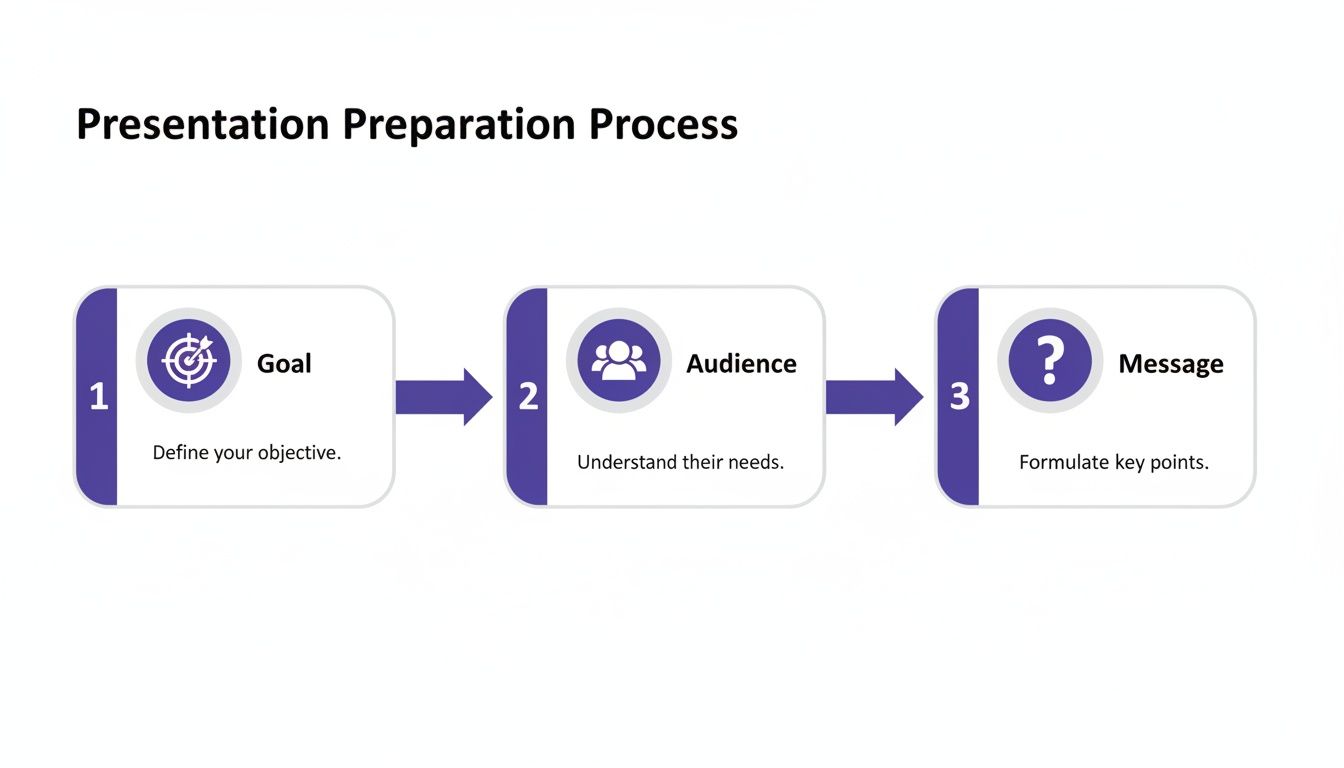
As you can see, a successful interactive session is built on a solid foundation: a clear objective and a real understanding of who you're talking to. Nail this, and you’re already halfway there.
Using Polls for More Than Just Icebreakers
Live polls are fantastic for getting a quick pulse-check from the room. They’re often used for fun icebreakers, but don't stop there. Their real power is in making decisions together, right on the spot.
Picture this: you're walking your team through a new product roadmap. Instead of just telling them what the priorities are, you launch a poll asking, "Which of these three features should we tackle in the next sprint?" In an instant, your audience is no longer just listening—they're co-pilots in the decision-making process. This gives you priceless feedback and, more importantly, fosters a sense of shared ownership.
Running Live Exercises That Actually Work
When you need to dig deeper, you’ll want to go beyond simple polls. Bringing workshop-style activities into a virtual presentation is a brilliant way to spark new ideas and keep people engaged. One of my favorites is the "1-2-4-All" method. It’s structured, inclusive, and works beautifully for remote teams.
Here’s the breakdown for a virtual setting:
- 1 (Solo Work): Give everyone one quiet minute to brainstorm on a specific prompt. Just them and their thoughts.
- 2 (Pairs): Use breakout rooms to pair people up for two minutes. Their job is to share their best ideas with each other.
- 4 (Small Groups): Now, merge two pairs into a group of four for another four minutes. Their task is to refine their collective ideas into one strong concept.
- All (Group Share): Finally, bring everyone back to the main session to share the top insights from each group.
This step-by-step approach ensures everyone contributes, even the more introverted members of your team. If you're looking for more facilitation techniques, you can find a great collection of interactive exercises for presentations here.
Picking the right technique depends entirely on what you want to achieve. Not every method fits every situation. To help you decide, here’s a quick guide to matching the activity to your goal.
Choosing the Right Interactive Technique
| Technique | Best For | Time Required | Pro Tip |
|---|---|---|---|
| Live Polls | Quick feedback, gauging consensus, making group decisions | 1-2 minutes | Use multiple-choice questions for fast, easy responses. |
| Q&A Session | Clarifying points, addressing concerns, fostering dialogue | 5-15 minutes | Have a moderator collect questions to keep the flow smooth. |
| Live Exercises (1-2-4-All) | Deep brainstorming, problem-solving, ensuring all voices are heard | 10-20 minutes | Provide a clear prompt and strict time limits for each step. |
| Breakout Activities | Small-group discussion, collaborative tasks, building connections | 15-30 minutes | Assign a facilitator in each room to keep the conversation on track. |
Use this table as a starting point. The more you experiment with these methods, the more you'll get a feel for what works best for your team and your specific presentation goals.
A successful interactive session feels less like a performance and more like a guided workshop. Your role is not just to present information but to create an environment where ideas can be shared, debated, and developed collectively.
One last thing that's absolutely crucial for remote teams: audio. If people can't hear each other clearly, engagement will nosedive. It's worth taking a few extra minutes to improve audio quality online for your presentations to make sure every voice is heard.
By weaving these real-time techniques into your delivery, you create an experience that’s not just informative but truly memorable. You’re no longer talking at your audience; you're building solutions with them. That’s how you turn a standard presentation into an event that actually matters.
4. Turn Your Slides into an Interactive Playground
Let's be honest: static, text-heavy slides are where audience attention goes to die. It's time to stop thinking of your presentation as a one-way information dump and start seeing it as the central hub for your entire interactive experience. This mental shift is a game-changer, especially when you're trying to keep a remote team tuned in.
Instead of just showing a chart, make it a puzzle. For instance, you could present a graph on customer feedback trends but intentionally leave a key data point blank. Then, fire up a quick poll and ask your audience to guess the missing number. Just like that, you've turned passive viewing into an active game.
When you embed interaction directly into your content, engagement becomes a natural part of the presentation's flow, not a clunky add-on. The goal is to make every slide a potential conversation starter.
Weave Interaction Directly into Your Slides
Your slides are the visual anchor of your talk, so they need to pull their weight in keeping people focused. You can build in all sorts of elements to break up the rhythm and give your audience a chance to participate.
Here are a few practical ways to do this:
- Clickable Quizzes: After you’ve covered a dense topic, drop in a short, multiple-choice quiz. It’s a great way to check for understanding and pull back anyone whose mind might be wandering.
- Short Video Prompts: A quick 30-second video—maybe a customer testimonial or a product demo—can be incredibly effective. Play the clip, then immediately follow it up with a targeted discussion question.
- Live Word Clouds: Ask an open-ended question like, "What one word describes our biggest challenge?" and use a tool that generates a live word cloud from the responses. It’s fascinating to watch the answers pop up on screen in real time.
For a slick way to get everyone involved, try integrating QR codes directly onto your slides. Attendees can scan them with their phones to instantly access links, polls, or extra resources. This is a fantastic trick for hybrid meetings, as it bridges the gap between the people in the room and those joining remotely.
If you're looking for more inspiration, we've got a whole list of creative ideas for a presentation.
Use Gamification to Boost Focus
Even in a serious business presentation, a little friendly competition can work wonders. Gamification isn’t about building a full-blown video game. It’s about using simple game-like mechanics to motivate your team and keep them locked in, which is especially helpful during a long meeting.
Research shows that using elements like points and leaderboards can boost audience motivation and retention by 48% in corporate settings. In fact, one study found that gamified slides led to 62% higher recall rates after the presentation.
Source: 2023 presentation trends report
You can apply these ideas in simple but powerful ways:
- Idea Leaderboard: During a brainstorm, assign points for each idea shared and show a live leaderboard on the screen.
- Virtual Badges: Give a virtual "badge" or a simple shout-out to the person who asks the most insightful question during the Q&A.
- Team Challenges: Split your audience into breakout rooms and give them a small problem to solve. The first team to come back with a solid solution "wins."
These small, strategic tweaks can completely transform your slides from a static backdrop into a dynamic and engaging playing field.
Making Room for Collaborative Brainstorming
An interactive presentation is about so much more than just keeping people from zoning out. The real magic happens when you shift from a one-way lecture to a two-way conversation where your team actually builds something together. For remote teams that crave connection, that old model of a speaker just broadcasting information while everyone else listens passively is a dead end.
The modern approach flips this on its head. Instead of treating your presentation as a final, polished product, think of it as a starting point—a launchpad for great discussions and new ideas. You have to intentionally build moments for your team to jump in and contribute, which transforms your meeting into a workshop where real progress is made.
From Sharing Information to Sparking Innovation
Let me paint you a picture. Imagine a product manager spends about ten minutes walking the team through the latest market research. Instead of just clicking to the next slide, they pivot and guide everyone into a live brainstorming session. The goal? To come up with new feature ideas based directly on the data everyone just absorbed.
That small shift is incredibly powerful. It forges a direct link between information and action. The team isn't just passively receiving facts; they're actively using them to solve a real problem. This is also a fantastic way to make sure you hear from everyone, including the quieter folks who might not otherwise speak up in a large group.
The best presentations don't just deliver a conclusion. They invite the audience to help figure out what comes next. You’re building a bridge from "Here's what we found" to "Okay, so what are we going to do about it?"
Pulling this off requires more than just good intentions; you need the right tools. There are some fantastic platforms out there designed for this kind of structured collaboration, guiding teams through exercises that give everyone an equal voice. If you want to see what’s available, we've put together a list of great online brainstorming tools that can completely change the dynamic of your virtual meetings.
How to Structure a Brainstorm Inside Your Presentation
You can’t just stop and say, “Alright, any ideas?” and expect brilliance to unfold. A great brainstorming session needs a clear structure. Dropping a brainstorming segment into your presentation means being intentional and using visual guides to keep everyone focused and moving forward.
A dedicated tool like Bulby, for instance, can walk your team through the process step-by-step, right inside your shared workspace.
This screenshot gives you a sense of how a structured tool can visually guide a team through an idea-generation exercise. Having a framework like this keeps the energy high and helps turn what could be a chaotic mess of ideas into clear, actionable insights.
The right visuals also make a huge difference in how your team understands complex information. For example, recent data visualization trends have been shown to improve audience comprehension by 35%. For remote tech teams, embedding interactive charts that they can explore together has boosted decision-making accuracy by a whopping 42%. You can learn more about these data visualization trends and see how to apply them.
When you pair clear data with a well-run brainstorming process, you’re not just showing your team information—you’re empowering them to act on it.
Got Questions? We've Got Answers
Even with the best plan, moving from a standard slideshow to a truly interactive session can feel a little daunting. Here are a few common questions I hear all the time, along with some practical advice.
How Do I Make a Presentation Interactive if My Audience Is Quiet?
Ah, the sound of crickets. We've all been there, especially in virtual meetings where it's all too easy for people to hide behind a muted mic and a turned-off camera. The trick is to ease people into participation with low-stakes interactions that don't put anyone on the spot.
Start with something simple, like an anonymous poll. A quick multiple-choice question gets everyone involved without the pressure of speaking up. I also love using word clouds or emoji reactions—they give you an instant visual read on the room's energy without forcing anyone to be the first to talk.
Here's a pro tip I use all the time: Pose a question, then ask everyone to send their thoughts directly to you in a private message. This lets you gather fantastic insights to share with the group ("A few people mentioned that…") while making introverted team members feel comfortable and heard.
Structured activities are your secret weapon against silence. A tool with clear, step-by-step prompts creates a safe, predictable space for everyone to add their ideas without feeling exposed.
What Are the Best Free Tools for Interactive Presentations?
You definitely don't need to break the bank to make your presentations more engaging. There are some fantastic free tools out there that can make a huge difference.
- For Live Polls & Q&A: I almost always recommend Slido or Mentimeter. Both have solid free plans that are perfect for adding polls, quizzes, and organized Q&A sessions.
- For Collaborative Whiteboarding: You can't go wrong with the free versions of Miro or Mural. They give you an incredible digital canvas for brainstorming sessions and group exercises.
- Built-in Features: Don't forget to check what you already have! The built-in Q&A feature in Google Slides, for instance, is surprisingly effective and super easy to use.
My advice? Just pick one and get really good at it. Trying to learn three new tools at once just creates tech headaches and distracts you from what really matters—your message.
How Much Time Should Be Interactive in a 60-Minute Presentation?
Finding that sweet spot is key. Too little interaction and you'll see people start multitasking. Too much, and the whole thing can feel disorganized. I've always found the "10-minute rule" to be a great guideline—plan some kind of engagement at least every 10 minutes to keep people's attention locked in.
For a standard 60-minute meeting, I aim for about 15-20 minutes of total interaction time, broken up into smaller chunks. Here’s what that could look like:
- A quick 5-minute poll or icebreaker right at the start to get everyone warmed up.
- A meatier 10-minute brainstorming session or breakout activity somewhere in the middle.
- A dedicated 5-minute Q&A to wrap things up and answer any lingering questions.
Of course, this isn't a rigid formula. If your goal is to make a big decision as a group, you’ll naturally need more time for collaboration. But if you're just delivering a status update, a few quick polls might be all you need.
Ready to turn those quiet brainstorming sessions into vibrant, co-creative workshops? Bulby uses guided, research-backed exercises to make sure every voice is heard and every great idea gets captured. See how Bulby works.