
Let's be honest: we've all sat through a presentation that felt like it could have been an email. You know the one—where the presenter just clicks through dense slides while half the audience is secretly checking their phones. That old-school, one-way monologue just doesn't cut it anymore.
The problem isn't your audience; it's the format. When people are expected to just sit and listen, their minds naturally wander. In fact, a recent survey found that 1 in 3 people now multitask during talks. If you're not giving them a reason to tune in, they'll find their own distractions.
The Power of Active Participation
This is where interactivity changes the game. When you shift from a monologue to a dialogue, the audience goes from being a passive observer to an active participant. It creates a feedback loop that keeps everyone focused, invested, and part of a shared conversation.
The data backs this up. Presentations that use interactive elements like live polls or Q&A sessions are read 41% more and stick in people's minds 21% longer than static ones. By simply inviting your audience to take part, you make your message more memorable and cut through the noise.
The Three Pillars of an Interactive Presentation
So, where do you start? Building a truly interactive experience comes down to getting three key things right. It’s not about just one gimmick; it's about a thoughtful combination of design, tools, and technology.
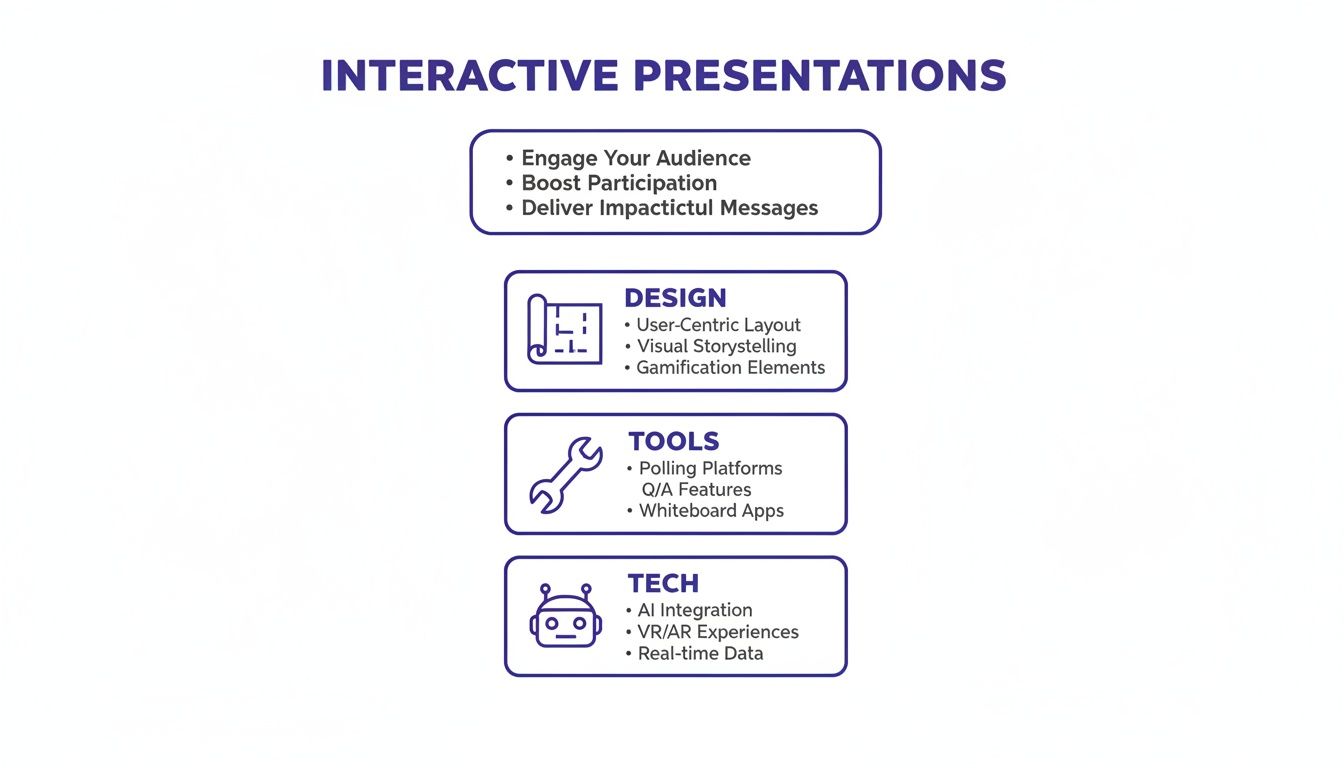
This approach pulls from the same playbook as successful interactive marketing strategies, where the goal is always to create an engaging, two-way conversation rather than just broadcasting a message.
An interactive presentation creates a psychological contract with the audience. When you ask for their input and act on it, you show respect for their time and expertise, which builds trust and buy-in instantly.
I get it—asking for participation can feel a little intimidating. Some presenters worry it will make attendees uncomfortable, a concern often linked to what psychologists call evaluation apprehension—the fear of being judged. The trick is to start with simple, low-stakes interactions. This helps build a safe and engaging environment where everyone feels comfortable contributing.
Interactive vs. Static Presentations At a Glance
To see the difference clearly, let’s break down how a modern, interactive approach stacks up against the traditional, static method. The contrast in both the experience and the results is stark.
| Element | Static Presentation (Traditional) | Interactive Presentation (Modern) |
|---|---|---|
| Flow | One-way information broadcast from presenter to audience. | Two-way dialogue; a shared conversation. |
| Audience Role | Passive consumption. The audience listens and observes. | Active participation. The audience contributes and co-creates. |
| Engagement | Low. Prone to multitasking and mind-wandering. | High. Keeps the audience focused and invested. |
| Feedback | Delayed or non-existent. Questions held until the very end. | Instant and ongoing through polls, Q&As, and activities. |
| Outcome | Information is often forgotten quickly. | High message retention and deeper understanding. |
| Presenter Focus | Delivering a pre-scripted message perfectly. | Facilitating a live experience and adapting to the audience. |
Ultimately, choosing an interactive format is about deciding whether you want to talk at your audience or with them. The latter is where real connection and impact happen.
Designing for Dialogue from the Start
A truly interactive presentation isn't just a slide deck with a poll tossed in the middle. It’s built for conversation from the ground up. This means shifting your mindset from being an expert who broadcasts information to a facilitator who guides a discussion. Your real goal is to create a structure that doesn't just allow for interaction but actually invites and even requires it.
This whole process starts way before you even think about opening PowerPoint or Google Slides. It begins with a simple question: who is in the room (or on the call)? Answering that question can completely reframe your approach and make sure your message actually lands.
Know Your Audience Before You Build
Before you draft a single slide, you have to get a read on your audience. A presentation for a team of senior engineers is going to feel completely different from one for a group of new marketing interns. Think of this initial analysis as the blueprint for an engaging experience.
Ask yourself these crucial questions:
- What's their current knowledge level? Are they beginners who need the basics, or are they experts looking for a deep dive? Getting this wrong is the fastest way to lose someone's attention.
- What are they hoping to get out of this? Are they here for a high-level strategy chat, a detailed project update, or hands-on training? You have to align with their expectations.
- What are their biggest headaches related to this topic? When you know their challenges, you can frame your content as the solution, which makes it instantly valuable.
Once you have these answers, you can start building a presentation that speaks directly to them. This step alone transforms your talk from a generic script into a personalized conversation. For more on this, our guide on how to make a presentation interesting has some great techniques.
Build Natural Pause Points into Your Structure
One of the most common mistakes I see is a presentation packed so tightly with information that there's no room for anyone to breathe, let alone participate. To make your sessions interactive, you have to intentionally build in moments for dialogue. I call these "conversational checkpoints."
Instead of just dumping data slide after slide, try structuring your content around key questions or even provocative statements. It naturally creates space for your audience to think and respond.
Here’s how you can weave these pause points into your flow:
-
The "What If" Opener: Kick things off with a hypothetical that challenges a common assumption. A sales manager might start with, "What if our biggest competitor just vanished tomorrow? What would be our first move?" This gets people thinking right away.
-
The Midpoint Pivot: After you share a key piece of data or a project update, just pause. Ask something like, "Based on what we've just seen, what's one opportunity or risk that comes to mind for you?" This shifts people from passive listening to active analysis.
-
The Storytelling Cliffhanger: Frame a section like a story. A project manager could say, "In Q2, we hit a major roadblock that put the entire timeline at risk." Then, before you reveal what you did, ask the team, "What would your first move be in this situation?"
These planned interruptions are the secret architecture of an interactive session. They're a clear signal to your audience that their input isn't just welcome—it's essential.
By designing your presentation as a series of mini-conversations instead of one long monologue, you respect the audience's collective intelligence and turn them into co-creators of the experience.
Frame Content Around Problems, Not Just Updates
Here’s another powerful shift: structure your content around challenges, not just a list of facts or status updates. People are natural problem-solvers. When you present a challenge, you invite them to turn on their critical thinking skills.
Think about a typical project update. The default is to list what's been done, which is informative but almost never engaging.
Now, check out this alternative framing:
| Traditional Update (Just the Facts) | Interactive Framing (Let's Solve This) |
|---|---|
| "We completed the user testing phase." | "During user testing, we found that 78% of users struggled with the checkout process. What are your initial thoughts on why that might be?" |
| "Marketing has finalized the new ad copy." | "Here are two versions of our new ad copy. Based on your experience, which one do you think will connect with our customers? Let's do a quick poll." |
This approach doesn't just make presentations more interactive; it makes them more productive. You get to tap into the collective wisdom in the room, uncover new insights, and give everyone a sense of shared ownership. When you design for dialogue from the start, you stop performing and start collaborating.
Your Practical Toolkit for Audience Engagement
Okay, you've got a solid structure for your presentation. Now for the fun part: filling it with moments that actually connect with people. This is where we get practical. Think of these techniques as your core building blocks for turning a room full of passive listeners into a group of active participants.
I like to group these methods into three main buckets: getting real-time feedback, running collaborative exercises, and adding a dash of lighthearted competition. Each has a different job, but they all work together to create a memorable, two-way conversation instead of a one-way lecture.
Gauge the Room with Real-Time Feedback
The quickest way to make someone feel seen is to ask for their opinion and show you’re actually listening. Real-time feedback tools are brilliant for this because they give you instant insights and make everyone feel like they're part of a collective experience. They are low-stakes, super easy to join, and fantastic icebreakers.
A couple of my go-to techniques:
- Live Polls: This is the classic for a reason. Use a simple multiple-choice poll to check for understanding, surface common assumptions, or even let the audience choose what you cover next. For example, I’ve seen trainers ask, "Which of these three challenges are you facing most right now?" and then pivot their content to whatever wins. It's incredibly powerful.
- Word Clouds: These are just plain fun for quick brainstorming. Ask an open-ended question like, "What one word comes to mind when you think of 'customer success'?" As people submit answers, a dynamic word cloud forms right before their eyes, visually showing the most common responses. It’s a great way to see shared perspectives emerge instantly.
The real magic of real-time feedback is that it makes the audience part of the narrative. Their input visibly shapes the direction of the conversation, turning a static presentation into a dynamic, co-created event.
Drive Deeper Thinking with Collaborative Exercises
While a quick poll can take the room's temperature, collaborative exercises are where you get people to really roll up their sleeves and think. These activities ask your audience to apply concepts, talk through ideas, and work together, which is a game-changer for retention.
The cognitive impact is huge. Research shows that audiences can remember 65-70% more from interactive sessions compared to just 10-20% from a standard lecture. That massive leap comes directly from the mental heavy lifting involved in active participation. You can discover more insights on the power of interactive learning and other helpful presentation statistics and trends.
Here are a couple of exercises to try:
- Think-Pair-Share: A classic that never fails. You pose a thought-provoking question, give everyone a quiet minute to think on their own, then have them discuss it with a neighbor before opening it up to the whole group. This is great because it gives introverts time to process and ensures you hear from more than just the usual suspects.
- Breakout Rooms: For any virtual or large-scale event, breakout rooms are a lifesaver. You can split the audience into small groups to tackle a specific problem or case study. I once saw a product manager send teams into breakouts to brainstorm solutions for a common user pain point. Each group came back with their top idea, and the energy was amazing.
If you're looking to build out a more robust set of activities, exploring a full range of interactive exercises for presentations can give you even more ideas to keep your sessions fresh and engaging.
Reinforce Learning with Lighthearted Gamification
A little friendly competition can be a fantastic way to re-energize an audience, especially during that post-lunch slump or at the end of a long day. It’s not about building a complex video game; it’s about using simple game mechanics to make learning stick.
One of the easiest ways to do this is with a quick quiz. After you’ve covered a critical section, launch a short, five-question quiz to see what landed. You can do a "fastest finger first" format for some excitement or just walk through the answers as a group. It not only solidifies the information but also gives you immediate feedback on what you might need to explain again.
Ultimately, these techniques are more than just bells and whistles. Beyond any specific tool, what really matters is understanding the principles behind them. This helpful guide to designing effective learning experiences can profoundly change how you structure your presentations, shifting them from simple talks to truly memorable events. By thoughtfully mixing and matching these methods, you create a presentation that respects your audience's time, taps into their collective wisdom, and ensures your message sticks around long after you’ve clicked off the final slide.
Using Tech and AI to Boost Interaction
Let’s be honest: technology can be your best friend when it comes to creating a truly interactive presentation. It’s no longer just about fancy slide transitions. Smart tools, especially those powered by AI, can take on a lot of the grunt work, freeing you up to focus on what really matters: crafting an experience that connects with your audience.
This isn't some far-off future, either. The shift is happening right now. A recent study found that 72% of presenters are already using AI to help generate content and layouts. That same study showed it can slash preparation time by up to 70%. Think about that—it's a massive time-saver. You get to spend less time fiddling with fonts and more time mapping out those crucial moments of audience engagement.
Using AI this way can also give your own creativity a serious jolt. When you're not bogged down by the tedious parts of slide design, you have more mental space to explore new ways to tell your story. If you want to dig deeper, it’s worth exploring how AI can help us be more creative by acting as a brainstorming partner.
Let AI Handle the Heavy Lifting
Think of AI as your personal design assistant. Instead of staring at a blank canvas, you can give it a simple prompt or an outline. AI tools will then spit out professional-looking slides, suggest powerful imagery, and even help you sharpen your talking points. It’s a game-changer for those of us who aren't graphic designers.
You get a polished, cohesive deck without burning hours on formatting. All that reclaimed energy can be poured directly into planning the polls, Q&As, and discussions that will make your presentation memorable.
This is what it looks like in practice. AI tools are now embedded directly into the software we use every day, making powerful design accessible to everyone.
Seamlessly Integrate Polling and Q&A Apps
Once you have a solid draft of your presentation, it’s time to weave in the tools that will bring it to life. Platforms like Slido or Mentimeter are designed to plug right into presentation software like PowerPoint and Google Slides, which makes them incredibly easy to use.
You can embed live polls, word clouds, or quizzes directly into your deck. When you get to that slide, the interactive element just pops up, and your audience can jump in using their phones. No fuss.
The best technology feels invisible. When interactive tools are seamlessly integrated, the audience doesn't notice the app—they just feel engaged in a dynamic, two-way conversation with you.
This smooth integration is critical. It prevents those awkward pauses where you have to switch windows or apps, which can completely derail the momentum you've built. The flow stays uninterrupted, and your audience stays right there with you.
Foster Collaboration with Digital Whiteboards
For hybrid meetings—where you have some people in the room and others joining from home—digital whiteboards are an absolute must. They create a shared virtual space where every single person can contribute ideas on an equal footing, no matter where they are.
Imagine you're running a brainstorming session. Instead of you doing all the talking, you can invite everyone onto a shared digital canvas.
- Real-time Brainstorming: People can add virtual sticky notes, draw connections, and vote on their favorite ideas all at the same time.
- Visual Problem-Solving: You can map out a complex process or a customer journey together, letting the group co-create the solution visually.
- Inclusive Participation: This is the big one. A digital whiteboard ensures remote attendees aren't just watching from the sidelines. They become active participants, leveling the playing field for everyone.
When you use these technologies thoughtfully, you're not just adding bells and whistles. You're architecting a more inclusive, participatory, and memorable experience that makes your message stick.
Making Remote and Hybrid Presentations Actually Work
Let's be honest: keeping a remote or hybrid audience engaged is tough. That digital wall between you and your participants is a real barrier, and it takes a different set of skills to break through it. Your goal shifts from just presenting information to creating a shared experience where everyone, no matter where they are, feels included.
This isn't about having flashier slides. It's about being an intentional facilitator. When you can't read the body language in the room, you have to build new ways to get feedback, keep the energy up, and make sure your message is actually connecting.
Get Yourself a Digital Co-Pilot
One of the single best moves you can make for a virtual presentation is to not fly solo. Ask someone to be your digital co-pilot or producer. This person isn’t just tech support; they’re an active part of your facilitation team, handling the behind-the-scenes chaos so you can focus on your audience.
Here’s what they can take off your plate:
- Chat Monitoring: They can jump on logistical questions, flag important comments for you, and generally keep the conversation moving.
- Launching Polls and Activities: Instead of you awkwardly fumbling with controls, your co-pilot can launch interactive moments right on cue.
- Managing Breakout Rooms: They can handle the setup, drop instructions into the chat, and troubleshoot for any groups that get stuck.
Having this support is a total game-changer. It frees up so much mental space and lets you be fully present, which is the secret to making a real connection through a screen. You can find more strategies like this in our complete guide to remote facilitation best practices.
Nail Your On-Camera Presence
When you're presenting from your desk, that little camera lens is your audience's window into your world. How you show up on screen directly affects how they feel. You don't need to be a professional actor, but a few simple techniques can help you project energy and confidence.
First, try to look directly into the camera lens, not at the faces on your monitor. I know, it feels weird, but to your audience, it creates the feeling of direct eye contact. Also, don't forget to use your hands. Intentional gestures add emphasis and keep you from looking like a static talking head.
A classic mistake is forgetting that your audience can only see what the camera sees. Sit up straight, lean in a bit to show you're engaged, and let your facial expressions do some of the work. Your non-verbal cues are just as powerful online.
Bridge the Hybrid Gap
Hybrid meetings are uniquely challenging because you're juggling two completely different audiences. It's so easy for remote folks to feel like they're just watching the "real" meeting from the sidelines. Your job is to actively bridge that gap.
Here are a few practical ways to create a more level playing field:
- The "One Person Remote" Rule: If even one person is joining remotely, have everyone join from their own laptop—even those in the same physical room. This equalizes how everyone communicates.
- Call on Remote People First: When you open the floor for questions or ideas, make a point to ask the remote attendees for their thoughts first. It's a small gesture that shows their input is a priority.
- Lean on Shared Digital Tools: Use things like digital whiteboards or collaborative documents for brainstorming. This gives everyone, regardless of location, the exact same ability to contribute.
Making these small adjustments can turn a clunky hybrid session into a genuinely cohesive and inclusive conversation where every single voice is heard.
How to Know if Your Presentation Actually Landed

The final slide is shown, the applause fades, but the real question hangs in the air: did it work? If you’ve gone to the trouble of making your presentation interactive, you can't just guess at the answer. You need to know for sure.
This means looking past simple attendance numbers and digging into how people actually engaged. Were they just passively watching, or were they leaning in and participating? The real story is in the data.
Digging Into Engagement Metrics
Start with the numbers you can actually count. It's not enough to know that you ran a poll; you need to know the participation rate. If you see that 85% of your audience jumped in to answer a question midway through, that's a fantastic sign they’re still with you.
From there, you can start to look at the quality of that interaction.
- Depth of Q&A: Are people asking basic, surface-level questions, or are their questions showing they’ve really absorbed the material? Specific, thoughtful questions are a goldmine—they prove you’ve sparked some real thinking.
- Quiz & Poll Results: If you used a quiz to check for understanding, what were the scores? If a lot of people got a question wrong, it’s not their fault; it’s a clear signal that you need to explain that concept better next time.
- Chat Activity: For virtual or hybrid events, a busy chat is a healthy sign. Look at how many relevant comments were made and, more importantly, how many different people were chiming in.
The goal here isn't to get a pat on the back. It's about finding out what to do better next time. Think of your metrics as a diagnostic tool, not a report card.
Creating a Feedback Loop for Growth
Your own data is only half the story. The other half comes directly from your audience. Sending out a quick post-presentation survey is one of the best ways to get honest feedback. Don't ask vague questions. Get specific: "Which interactive part was most helpful for you?" or "Was there any point where you started to tune out?"
This cycle of presenting, measuring, and adjusting is what separates good presenters from great ones. The demand for better engagement is why the presentation software market, valued at $7,548.6 million in 2025, is expected to skyrocket to $18,540.2 million by 2032. The tools are getting better, and our ability to analyze their impact has to keep pace. You can see more on this in these insightful presentation trends and statistics.
Block out ten minutes on your calendar right after each session for a quick debrief with yourself. Look at your metrics and read through the survey responses. By making this a habit, you guarantee that every single presentation you give is more impactful than the last.
Still Have Questions About Interactive Presentations?
Even seasoned presenters get a little nervous about adding interactivity. It’s totally normal. Let's walk through a couple of the most common "what ifs" I hear from people so you can feel ready for anything.
What if Nobody Participates?
Ah, the classic fear: you ask a question, and all you hear are crickets. It's a valid concern, but one that's usually pretty easy to head off at the pass.
The trick is to ease people into it. Start with something anonymous and low-stakes. A simple word cloud or a quick multiple-choice poll gives everyone a chance to contribute without feeling singled out. Once they see how simple it is—and that other people are doing it—they'll be much more willing to jump into a more open discussion later on.
Also, make sure your questions actually matter. If the audience sees their feedback directly influencing the direction of the conversation, they'll feel like their participation is valuable, not just a gimmick.
How Much Interaction Is Too Much?
It's tempting to pack your presentation with activities, but this is one area where less is definitely more. Aim for quality over quantity.
A good rule of thumb is to plan for one interactive moment every 10-15 minutes. This helps reset the room's attention span. But don't treat that as a hard-and-fast rule. Instead, focus on creating 3-4 truly meaningful interactions that serve a specific purpose, like gathering insights or making a collective decision.
Bombarding your audience with constant polls and questions can make the whole thing feel disjointed. Each activity should feel like a natural part of the story you're telling, not just something you threw in to keep them from falling asleep.
Interaction isn’t just about fun and games. In a corporate or formal setting, you can use structured Q&As, ask for reflections on a surprising statistic, or run a quick poll to see where everyone stands on a key strategic point.
The need for these skills isn't going away. With remote work hitting a global adoption rate of 25% by 2023, being able to engage people through a screen is a non-negotiable skill. You can find more data on the presentation software market on coherentmarketinsights.com.
Ready to transform your team's virtual brainstorming sessions? Bulby provides a guided, structured process with AI-powered exercises designed to spark creativity and ensure every voice is heard. Break through creative blocks and develop better ideas with a tool built for remote collaboration. Start your journey with Bulby today!